# Welcome Samarians

This chapter is temporary and will be removed before the book is published

# START HERE

### **Welcome Samarians!**

Welcome fellow intrepid Authors! Let's write a book together!! :)

If you're editing already or ready to copy into a page watch this 3min overview first!  
Just as in SEEDS it will make it much easier and give you context to go through all sections of this section of the wiki and the full introduction below as soon as you can ;)

<div id="bkmrk-"></div><div id="bkmrk--0"><iframe allowfullscreen="allowfullscreen" frameborder="0" height="360" src="https://www.loom.com/embed/66162cbfc1654a85aeab69d648b1facf" style="width: 100%; height: 450px;" width="640"></iframe>

</div><div id="bkmrk--1"></div>Here's a quick intro to the Wiki.. enjoy!

<iframe allowfullscreen="allowfullscreen" height="404" src="//www.youtube.com/embed/VJ2r15MJPnc" style="width: 100%; height: 450px;" width="720"></iframe>

# Status of the Chronicles

*The Chronicles of Samara are* co-created directly inside this wiki space, every participants will get Editor rights and can work on separate pages.

## Assigns

PG=Page, CH=Chapter

Order/synthesis of structure: Dmitriy, Joachim, Bongi  
Cover: Joachim  
PG: Preface: Identity Pod (Roz, Alan, Dmitriy, Trent)  
PG: Dedication: Identity Pod (Roz, Alan, Dmitriy, Trent)  
PG: Who this book is for: Joachim &amp; Bongi.  
PG: How to use this book: Joachim &amp; Bongi  
CH: Enter the World of Samara: Identity Pod (Roz, Alan, Dmitriy, Trent)

CH: Samara’s Stories : YOU :slight\_smile: (All Quest) to add own pages (perhaps from individual boards in Miro). \[If on Monday not everyone has added or perhaps these pages are not cohesive, we can set aside to put in v2.0\]  
  
PG: What Has Worked so far and What we would do Differently: YOU :slight\_smile: (All Quest)  
CH: Grow the Roots: Game Guide Primary Pod + Joachim  
CH: Strengthen the Trunk: Justin

CH: Sprout the Branches  
PG: What is a Pilot Project: Local Pilots Primary Pod (Drigo, Jared, Fabi, Sven)  
PG: Relationship with Hypha Movement Building Circle (MBC): Tyler  
PG: Our Current Pilot Support: Local Pilots Primary Pod (Drigo, Jared, Fabi, Sven)  
PG: Tools and Technology: Joachim and Bongi  
CH: Future Flowers and Seeds: Alan + Joachim + Irina + Bongi+ Tyler  
Epilogue: Bongi + Joachim  
Glossary: Any &amp; All Editors  
Reference: Trent  
About the Authors: Alan + Bongi

## Activities

<table border="1" id="bkmrk-activity-lead-status" style="border-collapse: collapse; width: 100%; height: 170px;"><tbody><tr style="height: 29px;"><td style="width: 49.0432%; height: 29px;">**Activity**</td><td style="width: 18.0929%; height: 29px;">**Lead**</td><td style="width: 12.1232%; height: 29px;">**Status**</td><td style="width: 26.9135%; height: 29px;">**Comments**</td></tr><tr style="height: 29px;"><td style="width: 49.0432%; height: 29px;">Install BookStack Wiki on Cloudron</td><td style="width: 18.0929%; height: 29px;">Joachim</td><td style="width: 12.1232%; height: 29px;">Done</td><td style="width: 26.9135%; height: 29px;"> </td></tr><tr style="height: 10px;"><td style="width: 49.0432%; height: 10px;">Register and invite all participants to Cloudron</td><td style="width: 18.0929%; height: 10px;">Bongi</td><td style="width: 12.1232%; height: 10px;">Done</td><td style="width: 26.9135%; height: 10px;">Use Cloudron credentials</td></tr><tr style="height: 29px;"><td style="width: 49.0432%; height: 29px;">Adjust and confirm the structure of the outline</td><td style="width: 18.0929%; height: 29px;">Bongi: Some changes but big ones abandoned - finishing + editing needed most</td><td style="width: 12.1232%; height: 29px;">Done</td><td style="width: 26.9135%; height: 29px;">Via [Miro Board](https://miro.com/app/board/o9J_lbxrQ7o=/)</td></tr><tr style="height: 12px;"><td style="width: 49.0432%; height: 10px;">Divvy up the work among all participants for each chapter</td><td style="width: 18.0929%; height: 10px;">Irina</td><td style="width: 12.1232%; height: 10px;">Open</td><td style="width: 26.9135%; height: 10px;">Via [Miro Board](https://miro.com/app/board/o9J_lbxrQ7o=/)</td></tr><tr style="height: 10px;"><td style="width: 49.0432%; height: 10px;">Launch hackathon and write, rewrite, cowrite, embed artifacts</td><td style="width: 18.0929%; height: 10px;">All</td><td style="width: 12.1232%; height: 10px;">Open</td><td style="width: 26.9135%; height: 10px;">Artifacts from anyone</td></tr><tr style="height: 14px;"><td style="width: 49.0432%; height: 14px;">Do a periodic group review and decide on status</td><td style="width: 18.0929%; height: 14px;"><span style="color: #ff0000;">*Bongi: propose Thursday formal move to review in Trunk*</span></td><td style="width: 12.1232%; height: 14px;">Open</td><td style="width: 26.9135%; height: 14px;"> </td></tr><tr style="height: 29px;"><td style="width: 49.0432%; height: 29px;">Do an editorial review and final approval</td><td style="width: 18.0929%; height: 29px;"><span style="color: #ff0000;">*Bongi: propose Friday formal move to editing + final approval Monday*</span></td><td style="width: 12.1232%; height: 29px;">Open</td><td style="width: 26.9135%; height: 29px;">UK vs US grammar and spelling rules, footnotes and ref notes, e.g. \[Str2020\]</td></tr><tr><td style="width: 49.0432%;">Update wiki formatting (fonts, colors, chapter icons)</td><td style="width: 18.0929%;">Joachim</td><td style="width: 12.1232%;">In Progress</td><td style="width: 26.9135%;">Via Wiki Settings</td></tr><tr style="height: 10px;"><td style="width: 49.0432%; height: 10px;">Deliver the wiki as PDF and/or epub for the TD call</td><td style="width: 18.0929%; height: 10px;">Joachim</td><td style="width: 12.1232%; height: 10px;">In Progress</td><td style="width: 26.9135%; height: 10px;">Via [https://convertio.co/](https://convertio.co/) </td></tr></tbody></table>

The best way to catch up on all the writing is from the left side "Recent Activity" here (click on the "Game Guide" breadcrumb thingy in the middle). As an admin you can also access the audit log below showing all edits ever done in the wiki.

[![image-1618256128776.png](https://guide.hypha.earth/uploads/images/gallery/2021-04/scaled-1680-/image-1618256128776.png)](https://guide.hypha.earth/uploads/images/gallery/2021-04/image-1618256128776.png)

##### <iframe height="250" src="https://guide.hypha.earth/settings/audit" style="width: 100%; height: 350px;" title="Logfile" width="500"></iframe>


#####  

##### Wiki Settings

- Public access to all pages (so we can share content without logging in)
- Editor access only via Cloudron accounts (so we know who can edit)
- Enable Comments (for quick feedback on content)
- WYSIWYG Editor enabled (we can switch to markdown if desired)
- Styling partially applied (font-size 1.1em, font-family: Cabin Sketch (for headings) and Open Sans)

##### Links

- [Hypha Handbook (Rieki)](https://docs.google.com/document/d/1hFJPe1N0yyntJ9g-iQFvhtf9j2pDsxmmG-ufxqnAt5g/edit#heading=h.70h6hrv9gwcp)
- [Valve Handbook (Valve)](https://media.steampowered.com/apps/valve/Valve_Handbook_LowRes.pdf)
- [Enspiral Handbook](https://handbook.enspiral.com/ "https://handbook.enspiral.com/")
- [ GitLab Handbook](https://about.gitlab.com/handbook/)
- [Notepad (Joachim)](https://notepad.hypha.earth/Fx5GF9ibSp-HN42-idJg0w?view)
- [Miro Board (Paulo)](https://miro.com/app/board/o9J_lYgoZw0=/)
- [Miro Board (Irena)](https://miro.com/app/board/o9J_lbxrQ7o=/)
- [Mural Board](https://app.mural.co/t/dho0763/m/dho0763/1610731584677/6f3f3e1997d8ee1fb5270a7ee9786c8c14d2fa91) (Sanjay) - Hexagon Purpose Grid
- [Google Slides Samara Starter Kit](https://docs.google.com/presentation/d/1--zCL13IEU7gApODkCNu6t3E2i7N_rhkufJvkh4b7kY/edit?ts=606bb96c) (Joachim)
- [Google Slides Background Material](https://docs.google.com/presentation/d/1nc6wg-FG1dkVj94e6FTkN0dMA3qnqjZL4qVqdWXoW2w/edit#slide=id.gabaf74b60a_0_0) (Joachim)

# How to Edit Pages

Anyone with `Editor` rights can create a new page or edit an existing page in this wiki.

Click on the **Edit** button on the right to edit the page. If you do not see the **Edit** button, you are probably not logged in. If you need an Cloudron account to log in, please contact Joachim.

**Important:** This is a co-creation space, so others will be able to review and edit your content. If you see this warning:

<p class="callout warning">XYZ started editing in the last 60minutes and to be careful not to overwrite each others updates. </p>

*Do not edit the page* and come back later (or contact the person currently editing the page). Otherwise your edits might be overwritten by the person who saves it last. For those currently editing pages, please save them as soon as you are done and don't leave them open (in a draft mode).

To leave any comments on the page, *just mention them as italics on the page with your initials - JS*

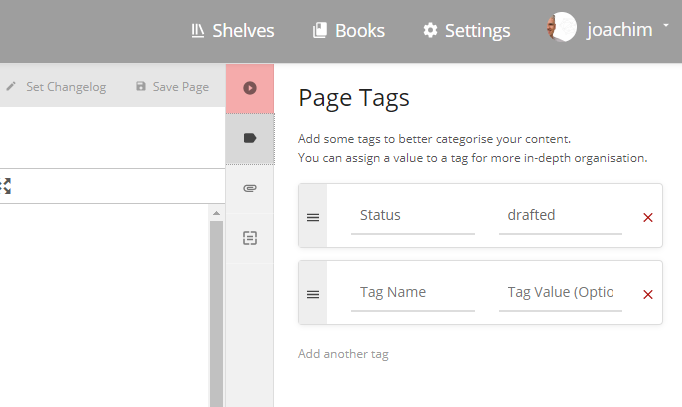
*To update the Editorial status of a page,* edit the page and click on the tag button (top right , see below) and type in one of the follwoing:

- [created](https://guide.hypha.earth/search?term=%5B%3Dcreated%5D) = new page, all edits welcome
- [drafted](https://guide.hypha.earth/search?term=%5B%3Ddrafted%5D) = needs improvement
- [completed](https://guide.hypha.earth/search?term=%5B%3Dcompleted%5D) = needs editorial review
- [approved](https://guide.hypha.earth/search?term=%5B%3Dapproved%5D) = ready for publishing

Then we can search for all of them using this query \[=drafted\] (for drafts) - click here to see this in action - [https://guide.hypha.earth/search?term=%5B%3Ddrafted%5D](https://guide.hypha.earth/search?term=%5B%3Ddrafted%5D "https://guide.hypha.earth/search?term=%5B%3Ddrafted%5D")

[![image-1618343465723.png](https://guide.hypha.earth/uploads/images/gallery/2021-04/scaled-1680-/image-1618343465723.png)](https://guide.hypha.earth/uploads/images/gallery/2021-04/image-1618343465723.png)
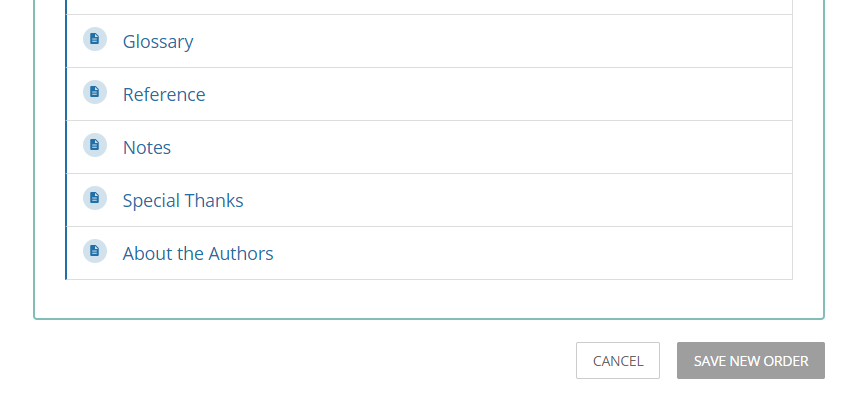
*To sort pages* into a different order, go back to the book or chapter view and click on the "Sort" button on the right. This will allow you to rearrange all chapters or pages in a new order. Don't forget to save the order (Click on the Save Order button at the very bottom of the form).

[![image-1618142386461.png](https://guide.hypha.earth/uploads/images/gallery/2021-04/scaled-1680-/image-1618142386461.png)](https://guide.hypha.earth/uploads/images/gallery/2021-04/image-1618142386461.png)
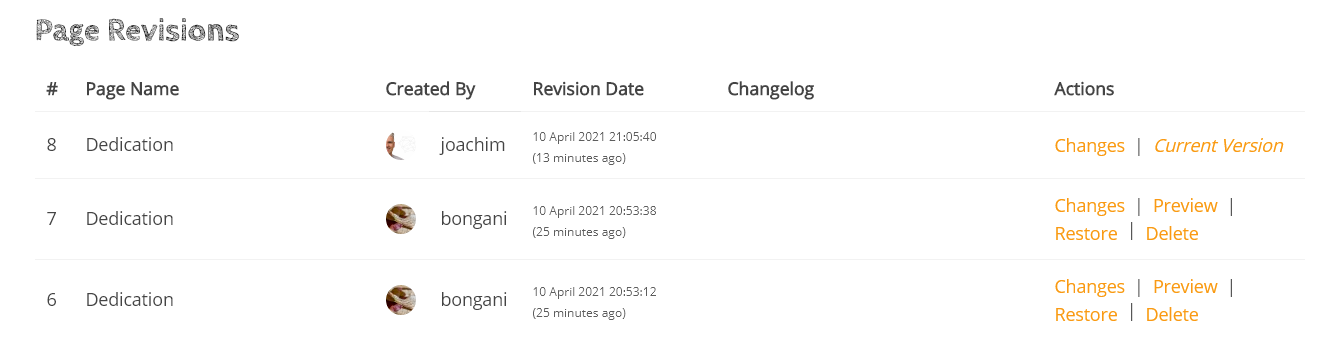
*To track any revisions* of your page (done by you or others), click on the "Revisions" link on the right of the page. You will see a screen like the one below, click on any entry to see what has changed on the page (text highlighted in red=removed, green=updated). If you restore a previous version, you will loose the edits between the current and the restored version.

[![image-1618089610406.png](https://guide.hypha.earth/uploads/images/gallery/2021-04/scaled-1680-/image-1618089610406.png)](https://guide.hypha.earth/uploads/images/gallery/2021-04/image-1618089610406.png)
*To add some additional highlights* to pages, use the following under Formats &gt; Callouts or Blockquotes:

<p class="callout success">Everyone is good to go.</p>

<p class="callout danger">There is some danger using this technique!</p>

<p class="callout info">This is some more information..</p>

<p class="callout warning">This is an important message </p>

> This is an important quote that helps to underline the text. This is an important quote that helps to underline the text. This is an important quote that helps to underline the text. This is an important quote that helps to underline the text. " -Fuller

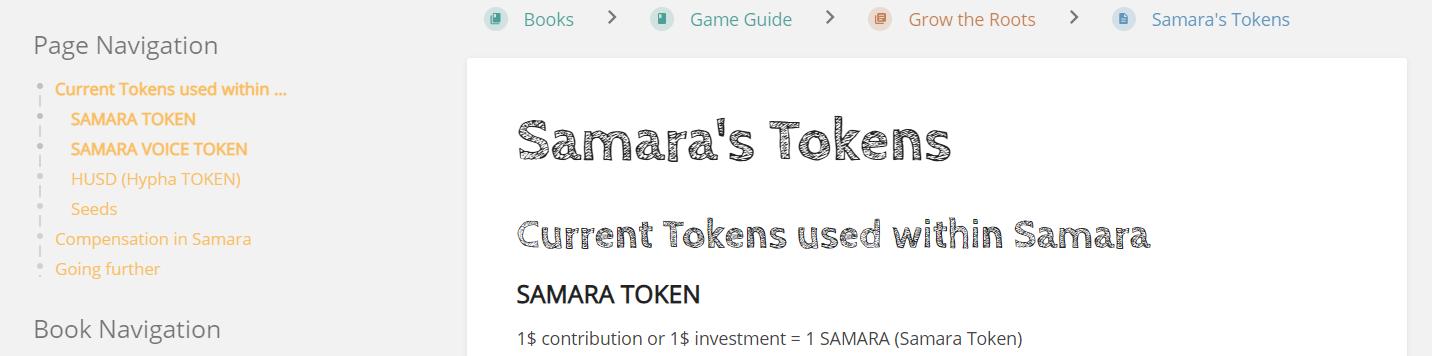
*To add structure to pages,* see the dropdown in the editor called Formats and the sample below. Once you assign different headings, they will structure the content of the page and allow you to use a page navigation tool (on the left below). Don't worry about the formatting of the headers for now, we can change this for all pages in the *Custom HTML Head Content* section.

[![image-1618255920409.png](https://guide.hypha.earth/uploads/images/gallery/2021-04/scaled-1680-/image-1618255920409.png)](https://guide.hypha.earth/uploads/images/gallery/2021-04/image-1618255920409.png)
For more help, please visit the [BookStack help documentation](https://www.bookstackapp.com/docs/).

# How to Embed Media

If you like to embed media assets on your page, edit this page, then click on one of the media assets and the Insert/edit Media button on the toolbar. Copy/paste the content of the Embed tab, open your page and insert your media asset with this code.

```
<iframe title="Notepad" 
  style="width: 100%; height: 450px;" // use 508px for docs
  src="YOUR URL GOES HERE" >
</iframe>
```

<iframe allowfullscreen="allowfullscreen" height="370" src="//player.vimeo.com/video/519513562?title=0&amp;byline=0" style="width: 100%; height: 450px;" width="720"></iframe>

<iframe allowfullscreen="allowfullscreen" height="404" src="//www.youtube.com/embed/wPWluMzyS50" style="width: 100%; height: 450px;" width="720"></iframe>

<iframe src="https://notepad.hypha.earth/Fx5GF9ibSp-HN42-idJg0w" style="width: 100%; height: 508px;" title="Notepad"></iframe>

<iframe allowfullscreen="allowfullscreen" frameborder="0" height="432" scrolling="no" src="https://miro.com/app/live-embed/o9J_lbxrQ7o=/" style="width: 100%; height: 508px;" width="768"></iframe>

<iframe allowfullscreen="allowfullscreen" frameborder="0" height="580" src="https://docs.google.com/presentation/d/e/2PACX-1vR6wa2rwJZMSqWESePQzeocdb2wMtLy-3Ja5J0x0HoPY1C9MREt7tZYJ1Ct2R53SQCdgYwg7qHRlGj-/embed?start=false&loop=false&delayms=3000" style="width: 100%; height: 508px;" width="960"></iframe>

# How to Structure Content

### Miro Board

<iframe allowfullscreen="allowfullscreen" frameborder="0" height="432" scrolling="no" src="https://miro.com/app/live-embed/o9J_lbxrQ7o=/?moveToViewport=8799,4361,2321,1145" style="width: 100%; height: 650px;" title="Miro" width="100"></iframe>

### Notepad

<iframe height="533" src="https://notepad.hypha.earth/Fx5GF9ibSp-HN42-idJg0w" title="Notepad" width="800"></iframe>

# How to Print Content

## Prepping

1. The TOC is generated automatically by BookStack but is placed in front. Hence you need to copy and paste that content into a new page after the cover page. All links will be preserved in the process.

## Printing

1. In the wiki, go to the full page structure at [https://guide.hypha.earth/books/the-chronicles-of-samara](https://guide.hypha.earth/books/the-chronicles-of-samara)
2. Click on *Export* on the right and select *Contained Web File.html* (this wil download an XHTML file)
3. Open the file in Chrome
4. Print the file and save as PDF (start with the cover page)
5. Convert the XHTML into MOBI or ePUB or other formats at [https://convertio.co/](https://convertio.co/)

# Samara CSS

&lt;!-- --&gt;  
&lt;!-- PLEASE DON'T EDIT THIS FILE --&gt;  
&lt;!-- CONTACT JOACHIM STROH FOR EDITS --&gt;  
&lt;!-- --&gt;

&lt;link rel="preconnect" href="https://fonts.gstatic.com"&gt;  
&lt;link href="https://fonts.googleapis.com/css2?family=Amatic+SC&amp;family=Cabin+Sketch:wght@700&amp;family=Open+Sans&amp;display=swap" rel="stylesheet"&gt;  
&lt;!-- script src="https://unpkg.com/pagedjs/dist/paged.polyfill.js"&gt;&lt;/script --&gt;  
&lt;style&gt;

body, button, input, select, label, textarea {  
font-family: 'Open Sans', sans-serif;  
font-size: 1.1em; /\* slightly larger for more readability \*/  
}

table { font-size: 0.8em; width: 80% !important; background-color: #f8f8f8; }  
table, td, th { border: 0px !important; padding: 10px !important; }  
tr:nth-child(even) { background-color: #f2f2f2; }

.content-wrap h1, .content-wrap h2 { font-family: 'Cabin Sketch', cursive; /\* use Amatic SC or Cabin Sketch \*/ }  
.content-wrap h1 { font-size: 3.2em; margin-top: 1em !important; }  
.content-wrap h2 { font-size: 2.1em; margin-top: 1em !important; }  
.content-wrap h3 { font-size: 1.2em; }  
.content-wrap h4 { font-size: 1.1em; }  
.content-wrap h5 { font-size: 1em; }

.content-wrap a { color: #ff9900; } /\* FED83D \*/

.CodeMirror, pre, #markdown-editor-input, .editor-toolbar, .code-base {  
font-family: monospace;  
}

@media print {  
body, button, input, select, label, textarea { font-size: 0.7em; }

.page-content { column-count: 2; column-gap: 30px; column-rule: 1px solid gray; }  
.cover, #bkmrk-page-title, h1 { column-span: all; page-break-after: always !important; break-before: always !important;}

h1 {margin-top: 1em !important;}  
iframe { display: none; }  
table { font-size: 0.6em; width: 80% !important; background-color: #f8f8f8; }  
table, td, th { border: 0px !important; padding: 10px !important; }  
tr:nth-child(even) { background-color: #f2f2f2; }  
body { margin: 5%;}  
h1\[id^="chapter-"\] { margin-top: 3em; font-size: 6em;}  
h1\[id^="page-5"\] { display: none;}  
p.cover img {width: 100%; object-fit: cover; column-span: all; page-break-after: always !important; break-before: always !important;}  
}

&lt;/style&gt;