# Shared Services

# Calendaring and Scheduling

### [![image-1630017030879.png](https://guide.hypha.earth/uploads/images/gallery/2021-08/scaled-1680-/image-1630017030879.png)](https://guide.hypha.earth/uploads/images/gallery/2021-08/image-1630017030879.png) 

<p class="callout danger">**CALENDAR CLEANUP TIME!**  
We have quite a few Google calendars floating around, and now is a good time to clear those out and move them to the shared Google calendar account at <calendar@hypha.earth>. </p>

### Introduction

<iframe allowfullscreen="allowfullscreen" height="449" src="//www.youtube.com/embed/fEqTCF4jeQg" width="800"></iframe>

*So, you want to schedule a Zoom meeting?* No problem! However, we have a limited amount of Zoom licenses, so a meeting can only be scheduled as a member of a specific circle in Hypha. Once you have confirmed for which circle the meeting is for, make sure your meeting *does not overlap with existing meetings* (licenses do not allow concurrent meetings).

<p class="callout info">The embedded calendar below shows times in GMT+0 UTC only. Once you add the calendar to your personal Google calendar, it will convert to your local timezone. To add calendars to your calendar, simply click on the "+" sign at the bottom of the embedded calendar below.</p>

[https://calendar.google.com/calendar/embed?src=6o4hreq9510es3u7u58a2moor8%40group.calendar.google.com&amp;ctz=UTC](https://calendar.google.com/calendar/embed?src=6o4hreq9510es3u7u58a2moor8%40group.calendar.google.com&ctz=UTC)

<iframe frameborder="0" height="600" scrolling="no" src="https://calendar.google.com/calendar/embed?height=600&wkst=1&bgcolor=%23ffffff&ctz=UTC&src=ZGpuYXBmcWJrdmlxMWJyN2FwZHBpb284cGNAZ3JvdXAuY2FsZW5kYXIuZ29vZ2xlLmNvbQ&src=OXY1NGZ1N2NvYmJjNmNvNTVxYmxsNXA1NjhAZ3JvdXAuY2FsZW5kYXIuZ29vZ2xlLmNvbQ&src=Nm80aHJlcTk1MTBlczN1N3U1OGEybW9vcjhAZ3JvdXAuY2FsZW5kYXIuZ29vZ2xlLmNvbQ&src=Zmk4NGQ0cjZpcm5vbmJsbm82c2lvYmhrZ2tAZ3JvdXAuY2FsZW5kYXIuZ29vZ2xlLmNvbQ&src=NWhiZnRuczI5dW9jbDNlMGl2MnB2dGQ4ZmNAZ3JvdXAuY2FsZW5kYXIuZ29vZ2xlLmNvbQ&src=ZDUwbjJmcmk1dWliODVobHM4dm0wYWdscWdAZ3JvdXAuY2FsZW5kYXIuZ29vZ2xlLmNvbQ&src=Y3RiMmFtZ2N2Y3VzcjR0aWRtOW1saDRhdmNAZ3JvdXAuY2FsZW5kYXIuZ29vZ2xlLmNvbQ&src=bGpsdmxlMDNhNWpoMTE5cDRsZTBzdnYwOHNAZ3JvdXAuY2FsZW5kYXIuZ29vZ2xlLmNvbQ&color=%233F51B5&color=%23AD1457&color=%23F4511E&color=%238E24AA&color=%2333B679&color=%23F6BF26&color=%23E4C441&color=%23009688&showNav=1&showCalendars=0&mode=AGENDA&showTitle=0&showPrint=0" style="border-width: 0;" width="800"></iframe>

### How to create a Zoom meeting

As you recall, every circle has one Zoom license, so it is important to log into Zoom under the correct Zoom account for your circle. All login credentials are maintained in [Locker](#bkmrk-current-maintainers-), if you do not have access to Locker, please set up a [Locker](#bkmrk-current-maintainers-) account first (see below).

After you have successfully logged into Zoom, you can schedule your meeting. Click on **Meetings** and then on **Schedule a Meeting**. Fill in the form and pay attention to the following fields:

- **Timezone**: Always set this to GMT +0.00 UTC (this will avoid the Daylight Savings Times issue)
- **Recurring meeting:** click on the checkbox, if you repeat this meeting every week (set to weekly and give it an end date or the number of occurrences in the dropdown, eg. "20")
- **Security**: Check "passcode", it will automatically generate a link with the password attached

<p class="callout warning">It is not necessary to have the host be present at the meeting. However, you can share the host code with your team so host features are available (incl. recording and break out sessions). To share the host code, click on **Profile** and scroll down to Host Code. </p>

After you have created your meeting, you need to share the invite on the Hypha Google calendar.

[![image-1630014745737.png](https://guide.hypha.earth/uploads/images/gallery/2021-08/scaled-1680-/image-1630014745737.png)](https://guide.hypha.earth/uploads/images/gallery/2021-08/image-1630014745737.png)
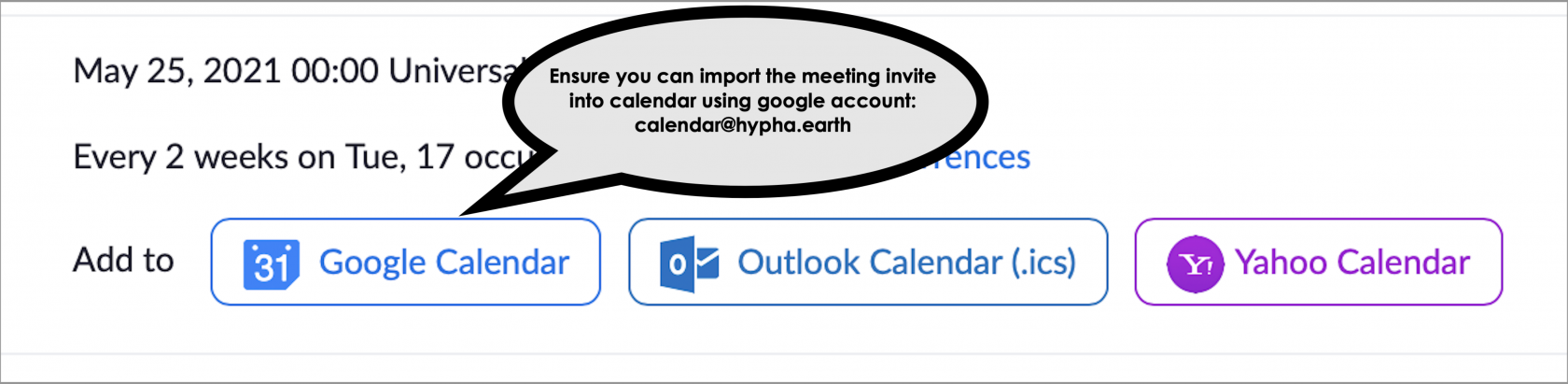
To add the invite to the correct calendar, you need to do two things:

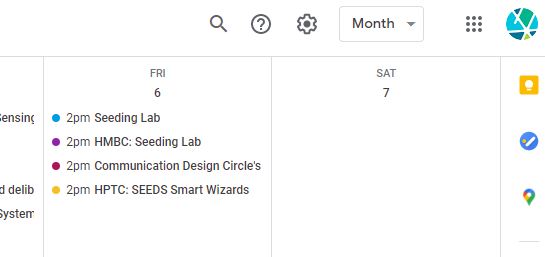
1. If the **Hypha Calendar Account** is NOT open, switch your Google calendar to the **Hypha Calendar Account** by clicking on the avatar on the top right of the calendar view (you will see a Hypha logo like shown below). If you need login credentials to the Hypha calendar Google account, please go to [Locker](#bkmrk-current-maintainers-).
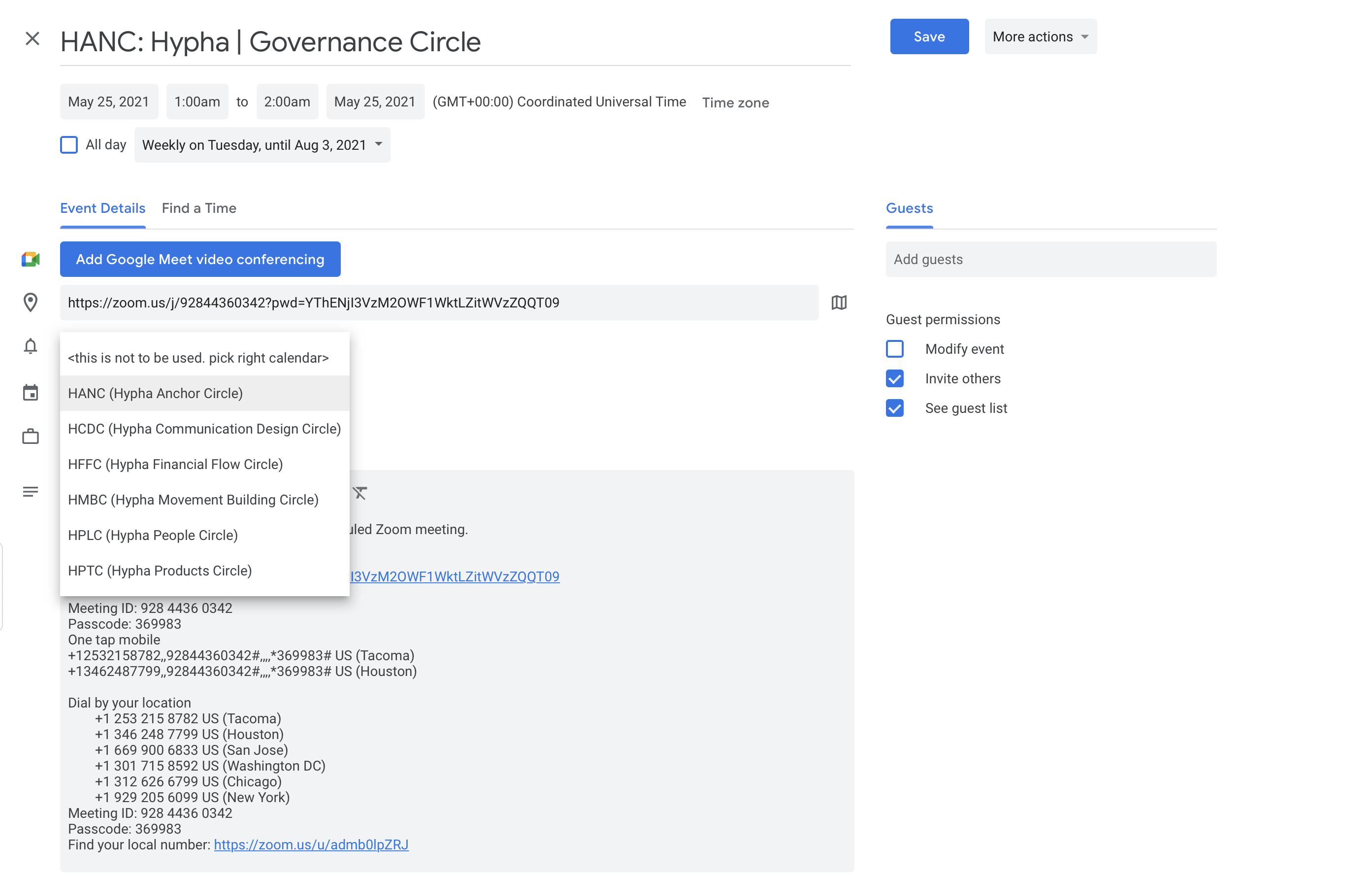
2. If the event you scheduled is not open, find and open the invite that you created and switch the calendar to the correct Google CIRCLE calendar (see dropdown next to the calendar icon below).
3. Save the calendar event.

[![image-1630014833694.png](https://guide.hypha.earth/uploads/images/gallery/2021-08/scaled-1680-/image-1630014833694.png)](https://guide.hypha.earth/uploads/images/gallery/2021-08/image-1630014833694.png)
[![image-1630014941703.png](https://guide.hypha.earth/uploads/images/gallery/2021-08/scaled-1680-/image-1630014941703.png)](https://guide.hypha.earth/uploads/images/gallery/2021-08/image-1630014941703.png)
### How to set up a Locker account

[https://locker.hypha.earth/](https://locker.hypha.earth/) is our secure vault to store all important Hypha usernames and passwords for shared services. Please decide who can access the passwords for Zoom and Google accounts in your circle. While we suggest the Lamp Lighter is a good candidate, it can be anyone in the circle. It is good practice to grant 2-3 people access to the passwords. To request access to Locker and the passwords, please Direct Message one of the maintainers below. You will receive an invitation link to Locker with a list of passwords for Zoom and the Hypha Google calendar account. Locate the Zoom passwords and the Google calendar passwords in the list (see below, each circle has its own login credential).

[![image-1630016006328.png](https://guide.hypha.earth/uploads/images/gallery/2021-08/scaled-1680-/image-1630016006328.png)](https://guide.hypha.earth/uploads/images/gallery/2021-08/image-1630016006328.png)

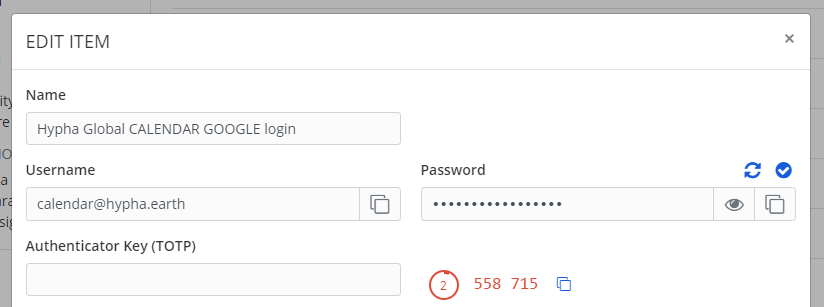
Click on the link to open the credentials page, e.g. for "HTPC [productscircle@hypha.earth"](mailto:productscircle@hypha.earth%22) you will see the following screen from where you can copy/paste the username and password:

[![image-1630017210769.png](https://guide.hypha.earth/uploads/images/gallery/2021-08/scaled-1680-/image-1630017210769.png)](https://guide.hypha.earth/uploads/images/gallery/2021-08/image-1630017210769.png)
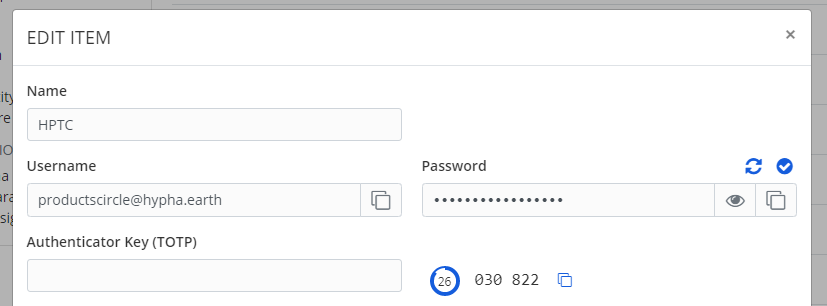
For the **Hypha Google calendar** (and other tools that require higher security), you may be prompted for 2-factor authentication (2FA). If this happens, click the copy icon next to the 6-digits counter underneath the password. Use that to paste it into the Google form that is asking for this second protection layer. This is triggered by Google to prevent unauthorized access to accounts and will usually no longer be necessary on subsequent logins.

<p class="callout warning">If the counter is getting close to zero it will change to red. Wait for the next cycle before your copy and paste the 6-digit code. </p>

[![image-1630017192561.png](https://guide.hypha.earth/uploads/images/gallery/2021-08/scaled-1680-/image-1630017192561.png)](https://guide.hypha.earth/uploads/images/gallery/2021-08/image-1630017192561.png)

### Current Maintainers of C&amp;S

- Joachim Stroh @joachimstroh on Discord

### Frequently Asked Questions

#### What if I can't log in?

Make sure you have access to **Locker** (see above) and use the correct username and passwords. We have different logins for Google and Zoom, so make sure to pick the right one when you log in. Also note that **Google** is asking (from time to time) for additional verification (called 2-factor authentication) and **Locker** will provide this as well (see screenshot above).

#### What if I accidentally double schedule?

Our Zoom license does not allow to schedule two meetings at the same time. Make sure you check the current calendars for any overlaps before you schedule your meeting. If for some reason an overlap occurs, Zoom will detect it and close the other meeting once a host has started the new (overlapping) meeting.

#### What if my calendar isn't syncing with Zoom?

Syncing calendars with Google is a one-way direction - once you have scheduled the meeting and "pushed" it to the Google calendar, it stays there. Any updates in Zoom will NOT be reflected on the Google calendar. To make changes, either edit the Google calendar directly or delete it and push another update to the calendar from Zoom.

#### What if my circle needs more licenses?

Hypha has a limited amount of licenses available at this time. Unfortunately, we cannot increase the number of licenses but we can revisit this once the current licenses need to be renewed early 2022. The current licenses are maintained [in this file by dStudio](https://docs.google.com/spreadsheets/d/1fYhgivvl1wJhOGVPJ_v0qxesnseA1yoLPU8ty5BgwOc/edit#gid=0).

#### Can we start the meeting without the host?

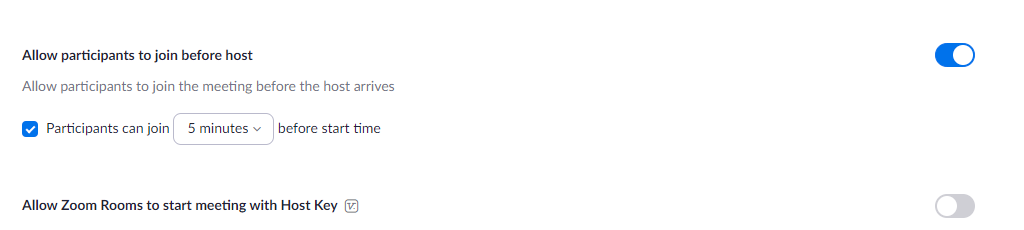
Yes, you can! In the settings section on Zoom, look for "Allow participants to join before host" and set it to 5 minutes before start time. Additionally, you can share the host key (under your profile settings) and share that with the team members. Keep in mind that you cannot record the meeting and use other host features if no host is present.

[![image-1635208584327.png](https://guide.hypha.earth/uploads/images/gallery/2021-10/scaled-1680-/image-1635208584327.png)](https://guide.hypha.earth/uploads/images/gallery/2021-10/image-1635208584327.png)
### More documentation

- [Zoom Help Documentation](https://support.zoom.us/hc/en-us)

### More todo

- Create new role for email and calendar management
- Sync all entries in Zoom.us with Google calendar

# Email Management

<p class="callout info">Hypha members are eligible for Hypha email addresses, such as <joe@hypha.earth>. Hypha does not provide full email support, so we suggest to forward messages from your Hypha account to your personal email account (e.g. at Gmail) as soon as you have access. </p>

<p class="callout warning">The guide is incomplete as of 11/29/21. Following activities need to be performed:  
  
1 Define new role for Email Management  
2 Clean up unused mailboxes (purge and/or delete)  
3 Enable forwarding for ALL remaining mailboxes  
4 Improve on Mail server status  
5 Set Postmark delivery to broadcast for Seeds newsletters</p>

### Introduction

Cloudron has a built-in mail server that can send and receive email on behalf of users and applications. By default, most of it's functionality is disabled and it only sends out mails on behalf of apps (for example, password reset and notification emails). Hypha has enabled Cloudron Email and offers a full-fledged mail server solution. Each user can get a mailbox `username@hypha.earth` and can send mails using SMTP and receive mails using IMAP. Admins can also setup server side mail filtering rules using ManageSieve.

Features of this mail solution include:

- Multi-domain support
- Enable mailboxes for users and groups on a domain level
- Per-user and group mail aliases (via [mailboxes](https://my.hypha.earth/#/email/hypha.earth))
- Mailbox sharing amongst users
- Group email addresses that forward email to it's members
- Email account sub-addressing by adding `+` tag qualifier
- Setup mail filters and vacation email using ManageSieve
- Catch all mailbox to receive mail sent to a non-existent mailbox
- Relay all outbound mails via SendGrid, Postmark, Mailgun, AWS SES or a Smart host
- Anti-spam. Users can train the spam filter by marking mails as spam. Built-in rDNS and zen spamhaus lookup. Admins can add custom spam rules for the entire server.
- Completely automated DNS setup. MX, SPF, DKIM, DMARC are setup automatically
- Let's Encrypt integration for mail endpoints
- Domains and IP addresses blacklisting
- Server-side mail signatures (can be set per domain)
- [REST API](https://docs.cloudron.io/api/) to add users and groups
- [Secure](https://docs.cloudron.io/security/#email) out of the box
- Full text search using Solr
- Event Log

### Hypha's email configuration

<table border="1" id="bkmrk-component-configurat" style="border-collapse: collapse; width: 100%; height: 834px;"><tbody><tr style="height: 36px;"><td style="width: 33.3333%; height: 36px;">**Component**</td><td style="width: 33.3333%; height: 36px;">**Configuration**</td><td style="width: 33.3333%; height: 36px;">**Access**</td></tr><tr style="height: 86px;"><td style="width: 33.3333%; height: 10px;">Webhost (.com)</td><td style="width: 33.3333%; height: 10px;">Bluehost for joinseeds.com

</td><td style="width: 33.3333%; height: 10px;">Unknown

</td></tr><tr style="height: 68px;"><td style="width: 33.3333%; height: 68px;">Webhost (.earth)</td><td style="width: 33.3333%; height: 68px;">Namecheap for joinseeds.earth and hypha.earth</td><td style="width: 33.3333%; height: 68px;">Locker</td></tr><tr style="height: 36px;"><td style="width: 33.3333%; height: 36px;">Mailserver</td><td style="width: 33.3333%; height: 36px;"> <span class="ng-binding">mail.hypha.earth</span></td><td style="width: 33.3333%; height: 36px;">Cloudron admins</td></tr><tr style="height: 64px;"><td style="width: 33.3333%; height: 64px;">Mailboxes</td><td style="width: 33.3333%; height: 64px;"><span style="text-decoration: underline;">[Hypha Mailboxes](https://my.hypha.earth/#/email)</span></td><td style="width: 33.3333%; height: 64px;">Cloudron admins</td></tr><tr><td style="width: 33.3333%;">Max email size</td><td style="width: 33.3333%;">25MB</td><td style="width: 33.3333%;">  
</td></tr><tr><td style="width: 33.3333%;">  
</td><td style="width: 33.3333%;">  
</td></tr><tr style="height: 52px;"><td style="width: 33.3333%; height: 52px;">Incoming Mail (IMAP)</td><td style="width: 33.3333%; height: 52px;">Server: <span class="ng-binding">mail.hypha.earth</span>  
Port: 993 ([TLS](https://www.sparkpost.com/resources/email-explained/ssl-tls-starttls-encyption/))</td><td style="width: 33.3333%; height: 52px;">Cloudron admins</td></tr><tr style="height: 52px;"><td style="width: 33.3333%; height: 52px;">Outgoing Mail (SMTP)</td><td style="width: 33.3333%; height: 52px;">Server: <span class="ng-binding">mail.hypha.earth</span>  
Port: 587 ([STARTTLS](https://www.sparkpost.com/resources/email-explained/ssl-tls-starttls-encyption/))</td><td style="width: 33.3333%; height: 52px;">Cloudron admins</td></tr><tr style="height: 52px;"><td style="width: 33.3333%; height: 52px;">Email filtering</td><td style="width: 33.3333%; height: 52px;"><span style="text-decoration: underline;">[ManageSieve](https://en.wikipedia.org/wiki/Sieve_(mail_filtering_language))</span>

Server: <span class="ng-binding">mail.hypha.ear</span><span class="ng-binding">th</span>  
Port: 4190 ([STARTTLS](https://www.sparkpost.com/resources/email-explained/ssl-tls-starttls-encyption/))

</td><td style="width: 33.3333%; height: 52px;">Cloudron admins  
[Docs](https://docs.cloudron.io/email/#sieve)</td></tr><tr><td style="width: 33.3333%;">Spam filtering</td><td style="width: 33.3333%;"><span style="text-decoration: underline;">[SpamAssassin](https://docs.cloudron.io/email/#custom-spam-filtering-rules)</span>

</td><td style="width: 33.3333%;">Cloudron admins

[Docs](https://cwiki.apache.org/confluence/display/SPAMASSASSIN/WritingRules)

</td></tr><tr style="height: 36px;"><td style="width: 33.3333%; height: 36px;">Email delivery</td><td style="width: 33.3333%; height: 36px;">Postmark

smtp.postmarkapp.com

Port: 587 ([STARTTLS](https://www.sparkpost.com/resources/email-explained/ssl-tls-starttls-encyption/))

</td><td style="width: 33.3333%; height: 36px;">Locker</td></tr><tr style="height: 36px;"><td style="width: 33.3333%; height: 36px;">Email clients</td><td style="width: 33.3333%; height: 36px;">Sogo</td><td style="width: 33.3333%; height: 36px;">Cloudron users</td></tr><tr style="height: 350px;"><td style="width: 33.3333%; height: 350px;">DNS Status</td><td style="width: 33.3333%; height: 350px;">**MX record**  
Hostname: @

Record type: MX

Expected value: 10 mail.hypha.earth.

Current value: 10 mail.hypha.earth.

**DMARC record**  
Hostname: \_dmarc

Record type: TXT

Expected value: v=DMARC1; p=reject; pct=100

Current value: v=DMARC1; p=reject; pct=100

</td><td style="width: 33.3333%; height: 350px;">Namecheap requires manual steps for MX records

</td></tr><tr style="height: 42px;"><td style="width: 33.3333%; height: 42px;">SMTP Status</td><td style="width: 33.3333%; height: 42px;">**OK**

</td><td style="width: 33.3333%; height: 42px;"></td></tr></tbody></table>

### How to add message streams to Postmark

We are using Postmark for email delivery (configured on Cloudron, see below). Postmark requires setting up [message streams](https://postmarkapp.com/message-streams) which distinguishes transactional from broadcast messages. It is a good practice to create as many message streams as possible to check the performance on the different types of email we are sending. To attach our messages to the different streams in Postmark, we need to include [the stream ID in the message header](https://postmarkapp.com/support/article/1207-how-to-create-and-send-through-message-streams).

[![image-1638285598949.png](https://guide.hypha.earth/uploads/images/gallery/2021-11/scaled-1680-/image-1638285598949.png)](https://guide.hypha.earth/uploads/images/gallery/2021-11/image-1638285598949.png)
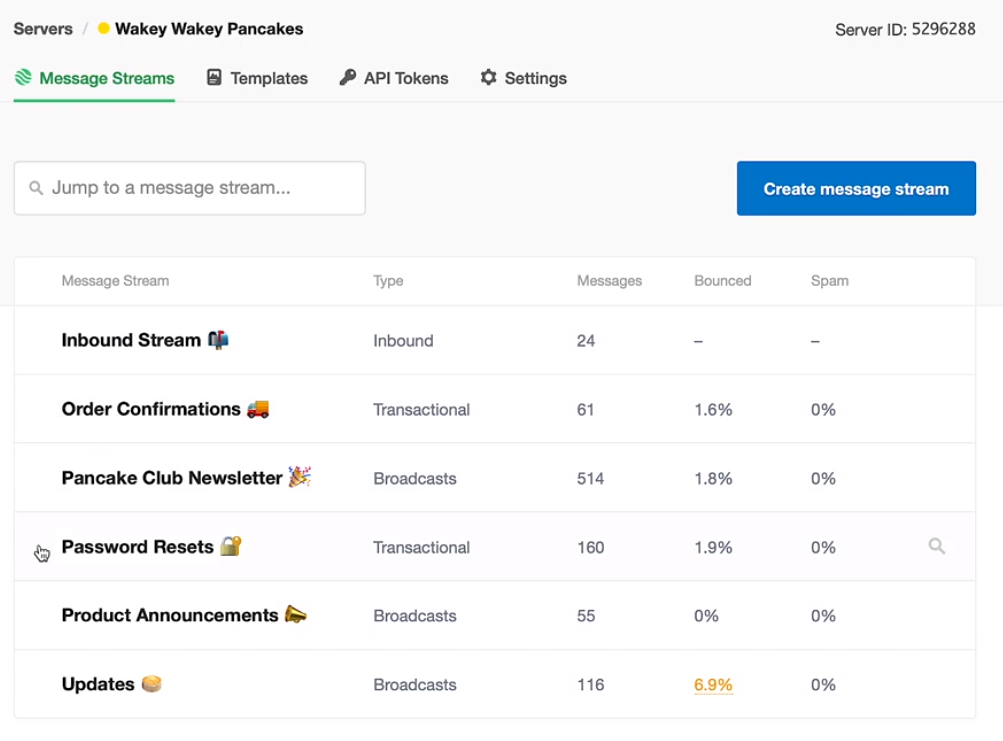
You can log into [Postmark](https://account.postmarkapp.com/servers) via Locker. Make sure to check the [outbound delivery statistics](https://account.postmarkapp.com/servers/6417390/streams/outbound/overview) from time to time. [Postmark can block delivery](https://postmarkapp.com/support/article/1207-how-to-create-and-send-through-message-streams#bestpractices) if you are using the wrong stream or go over the message quota. We are currently at 50,000 emails per month.

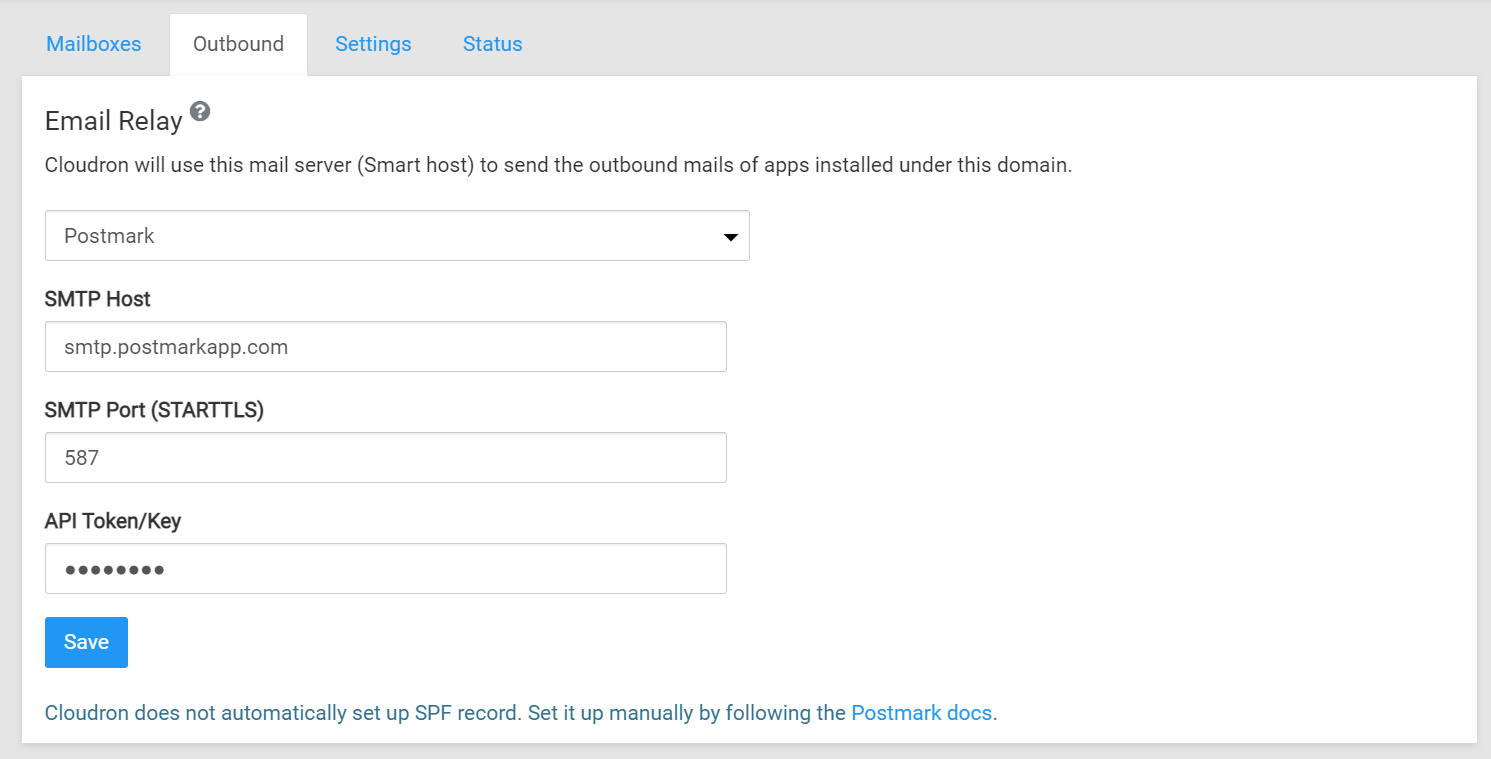
Here is the email configuration for Postmark on Cloudron:

[![image-1638202169082.png](https://guide.hypha.earth/uploads/images/gallery/2021-11/scaled-1680-/image-1638202169082.png)](https://guide.hypha.earth/uploads/images/gallery/2021-11/image-1638202169082.png)
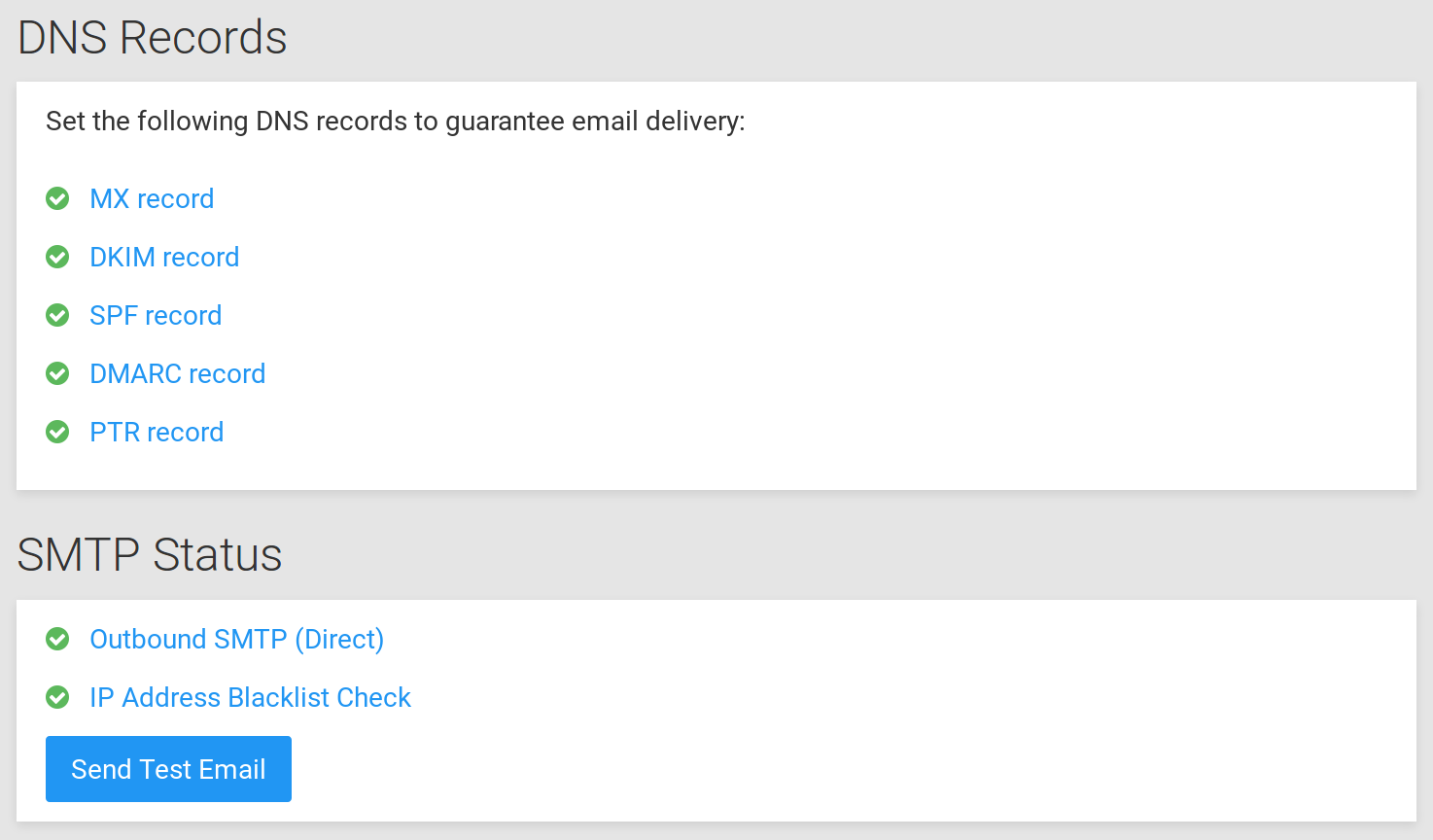
### How to maintain mail server status

<p class="callout warning">We currently have MX and DMARC records enabled. We want to enable SPF, DKIM and PTR as well.</p>

[![image-1632147087874.png](https://guide.hypha.earth/uploads/images/gallery/2021-09/scaled-1680-/image-1632147087874.png)](https://guide.hypha.earth/uploads/images/gallery/2021-09/image-1632147087874.png)

source: [https://docs.cloudron.io/email/#mail-server-status](https://docs.cloudron.io/email/#mail-server-status)

### How to create an email account

Every Hypha member that is interacting with clients or partners needs to use the Hypha email address, which currently has the format &lt;firstname&gt;@hypha.earth. Mailboxes are created on the Hypha Cloudron server, which allow email forwarding and sending-as so you can continue to use your preferred email client. Please note that Hypha does not store emails of members or supports email clients (Sogo is only forwarding emails). We also suggest to add a signature to your email correspondence, such as

<p class="callout info">--  
&lt;full name&gt;  
Co-Founder | Hypha DAO  
M: &lt;mobile with +country code&gt;  
&lt;city&gt;  
[https://hypha.earth](https://hypha.earth)   
[https://joinseeds.earth](https://joinseeds.earth)</p>

Please follow the steps below to request a Hypha email address if you are a member.

1. Request a new **user account** on Cloudron (if you have not already done so)
2. Request a new **mailbox account** from the Cloudron email administrator
3. Connect your email account to your preferred email client (below steps are for Gmail)

### How to read and send emails from Gmail

Go to your Gmail Settings &gt; Accounts and Import, then look for "Check mail from other accounts:" and "Add a mail account" ([<span style="text-decoration: underline;">see here for more info</span>](https://support.google.com/mail/answer/6078445?hl=en&co=GENIE.Platform%3DAndroid#zippy=%2Cadd-an-account)). Fill in the following forms below:

[![image.png](https://guide.hypha.earth/uploads/images/gallery/2022-08/scaled-1680-/image.png)](https://guide.hypha.earth/uploads/images/gallery/2022-08/image.png)
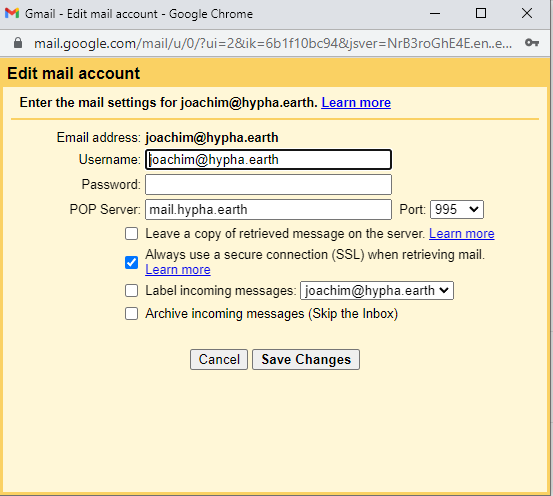
Hit Save Changes and you are done! Note that we are not storing any messages on the Hypha server, you will have them in your own email client.

### How to send-as emails from Gmail

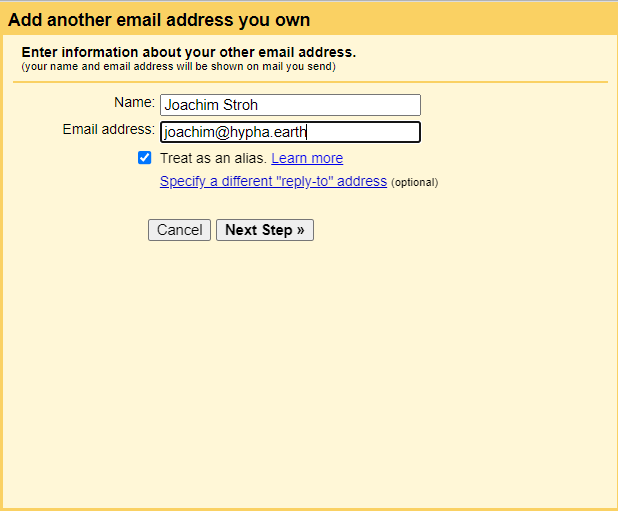
Go to your Gmail Settings &gt; Accounts and Import, then look for "Send mail as:" and "Add another email address" (<span style="text-decoration: underline;">[see here for more info](https://support.google.com/mail/answer/22370?hl=en)</span>). Fill in the following forms below:

[![image.png](https://guide.hypha.earth/uploads/images/gallery/2022-07/scaled-1680-/image.png)](https://guide.hypha.earth/uploads/images/gallery/2022-07/image.png)

For the next form you need the username and password for the Cloudron email server:

[![image.png](https://guide.hypha.earth/uploads/images/gallery/2022-07/scaled-1680-/PHcimage.png)](https://guide.hypha.earth/uploads/images/gallery/2022-07/PHcimage.png)
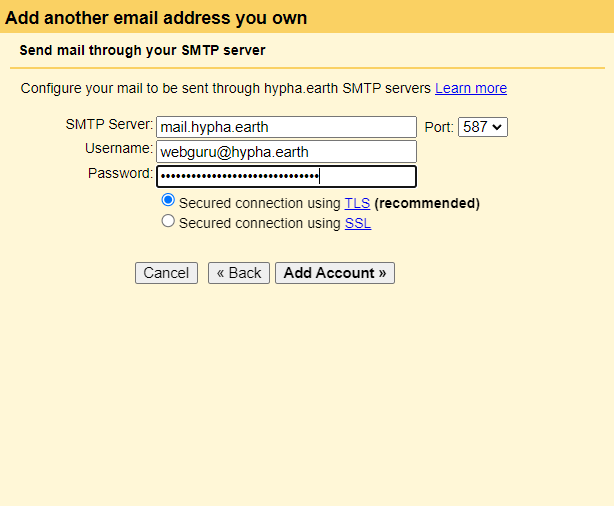
You can obtain this info through Locker - [https://locker.hypha.earth/](https://locker.hypha.earth/) - or by contacting the email admin person below.

The final step will send an email to your account, make sure you have access to this and enter the verification code in the last screen. That's it!

Also, enable email forwarding through Sogo - [https://email.hypha.earth/](https://email.hypha.earth/) - under Settings &gt; Mail &gt; Forward (Uncheck "Keep a copy", we do not want to store emails on our server). See above screenshots.

### How to set up a Locker account

<span style="text-decoration: underline;">[see here](https://guide.hypha.earth/books/managed-services/page/calendaring-and-scheduling#bkmrk-%23-how-to-set-up-a-lo)</span>

### Current Maintainers of Email

- Joachim Stroh @joachimstroh on Discord

### Frequently Asked Questions

### More documentation

- [https://docs.cloudron.io/email/](https://docs.cloudron.io/email/ "https://docs.cloudron.io/email/")
- [https://blog.roastidio.us/posts/send\_my\_own\_emails/](https://blog.roastidio.us/posts/send_my_own_emails/)

# Working With Wikis

# How to Edit Pages

Anyone with `Editor` rights can create a new page or edit an existing page in this wiki.

Click on the **Edit** button on the right to edit the page. If you do not see the **Edit** button, you are probably not logged in. If you need an Cloudron account to log in, please contact Joachim.

**Important:** This is a co-creation space, so others will be able to review and edit your content. If you see this warning:

<p class="callout warning">XYZ started editing in the last 60minutes and to be careful not to overwrite each others updates. </p>

*Do not edit the page* and come back later (or contact the person currently editing the page). Otherwise your edits might be overwritten by the person who saves it last. For those currently editing pages, please save them as soon as you are done and don't leave them open (in a draft mode).

To leave any comments on the page, *just mention them as italics on the page with your initials - JS*

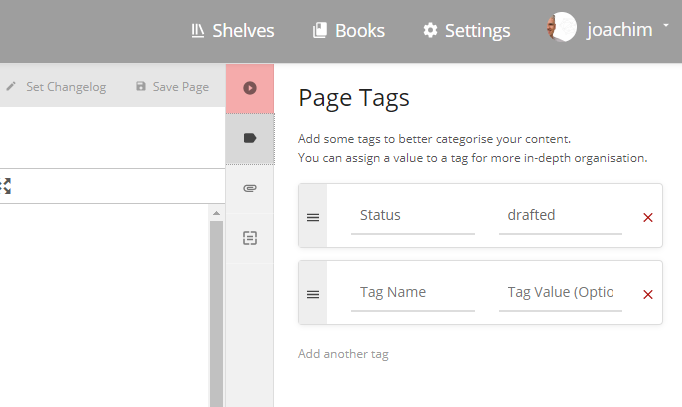
*To update the Editorial status of a page,* edit the page and click on the tag button (top right , see below) and type in one of the follwoing:

- [created](https://guide.hypha.earth/search?term=%5B%3Dcreated%5D) = new page, all edits welcome
- [drafted](https://guide.hypha.earth/search?term=%5B%3Ddrafted%5D) = needs improvement
- [completed](https://guide.hypha.earth/search?term=%5B%3Dcompleted%5D) = needs editorial review
- [approved](https://guide.hypha.earth/search?term=%5B%3Dapproved%5D) = ready for publishing

Then we can search for all of them using this query \[=drafted\] (for drafts) - click here to see this in action - [https://guide.hypha.earth/search?term=%5B%3Ddrafted%5D](https://guide.hypha.earth/search?term=%5B%3Ddrafted%5D "https://guide.hypha.earth/search?term=%5B%3Ddrafted%5D")

[![image-1618343465723.png](https://guide.hypha.earth/uploads/images/gallery/2021-04/scaled-1680-/image-1618343465723.png)](https://guide.hypha.earth/uploads/images/gallery/2021-04/image-1618343465723.png)
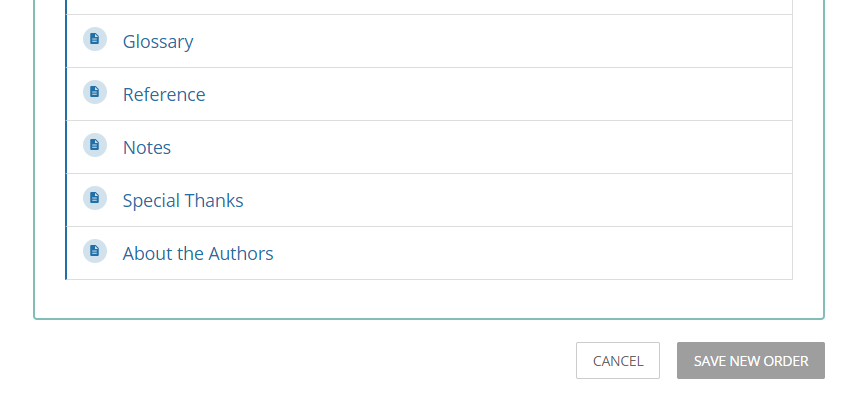
*To sort pages* into a different order, go back to the book or chapter view and click on the "Sort" button on the right. This will allow you to rearrange all chapters or pages in a new order. Don't forget to save the order (Click on the Save Order button at the very bottom of the form).

[![image-1618142386461.png](https://guide.hypha.earth/uploads/images/gallery/2021-04/scaled-1680-/image-1618142386461.png)](https://guide.hypha.earth/uploads/images/gallery/2021-04/image-1618142386461.png)
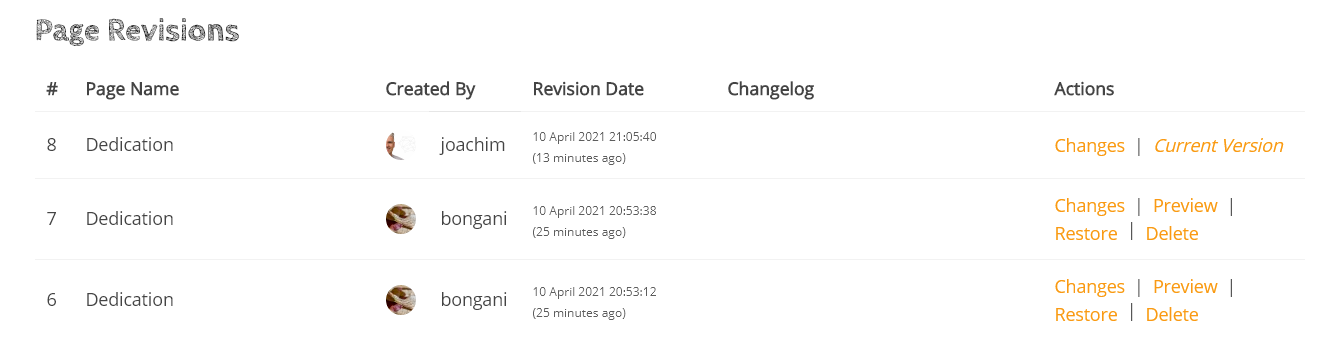
*To track any revisions* of your page (done by you or others), click on the "Revisions" link on the right of the page. You will see a screen like the one below, click on any entry to see what has changed on the page (text highlighted in red=removed, green=updated). If you restore a previous version, you will loose the edits between the current and the restored version.

[![image-1618089610406.png](https://guide.hypha.earth/uploads/images/gallery/2021-04/scaled-1680-/image-1618089610406.png)](https://guide.hypha.earth/uploads/images/gallery/2021-04/image-1618089610406.png)
*To add some additional highlights* to pages, use the following under Formats &gt; Callouts or Blockquotes:

<p class="callout success">Everyone is good to go.</p>

<p class="callout danger">There is some danger using this technique!</p>

<p class="callout info">This is some more information..</p>

<p class="callout warning">This is an important message </p>

> This is an important quote that helps to underline the text. This is an important quote that helps to underline the text. This is an important quote that helps to underline the text. This is an important quote that helps to underline the text. " -Fuller

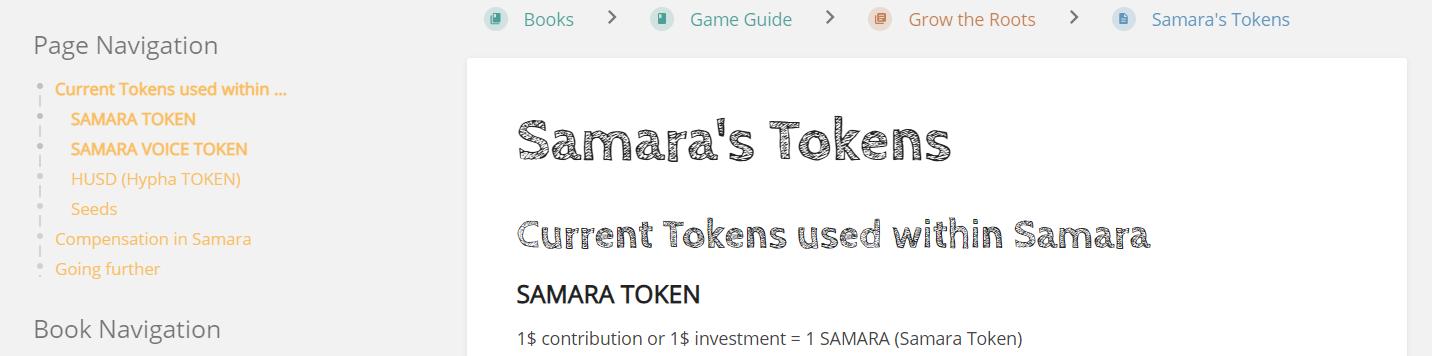
*To add structure to pages,* see the dropdown in the editor called Formats and the sample below. Once you assign different headings, they will structure the content of the page and allow you to use a page navigation tool (on the left below). Don't worry about the formatting of the headers for now, we can change this for all pages in the *Custom HTML Head Content* section.

[![image-1618255920409.png](https://guide.hypha.earth/uploads/images/gallery/2021-04/scaled-1680-/image-1618255920409.png)](https://guide.hypha.earth/uploads/images/gallery/2021-04/image-1618255920409.png)
For more help, please visit the [BookStack help documentation](https://www.bookstackapp.com/docs/).

# How to Embed Media

If you like to embed media assets on your page, edit this page, then click on one of the media assets and the Insert/edit Media button on the toolbar. Copy/paste the content of the Embed tab, open your page and insert your media asset with this code.

```
<iframe title="Notepad" 
  style="width: 100%; height: 450px;" // use 508px for docs
  src="YOUR URL GOES HERE" >
</iframe>
```

<iframe allowfullscreen="allowfullscreen" height="370" src="//player.vimeo.com/video/519513562?title=0&amp;byline=0" style="width: 100%; height: 450px;" width="720"></iframe>

<iframe allowfullscreen="allowfullscreen" height="404" src="//www.youtube.com/embed/wPWluMzyS50" style="width: 100%; height: 450px;" width="720"></iframe>

<iframe src="https://notepad.hypha.earth/Fx5GF9ibSp-HN42-idJg0w" style="width: 100%; height: 508px;" title="Notepad"></iframe>

<iframe allowfullscreen="allowfullscreen" frameborder="0" height="432" scrolling="no" src="https://miro.com/app/live-embed/o9J_lbxrQ7o=/" style="width: 100%; height: 508px;" width="768"></iframe>

<iframe allowfullscreen="allowfullscreen" frameborder="0" height="580" src="https://docs.google.com/presentation/d/e/2PACX-1vR6wa2rwJZMSqWESePQzeocdb2wMtLy-3Ja5J0x0HoPY1C9MREt7tZYJ1Ct2R53SQCdgYwg7qHRlGj-/embed?start=false&loop=false&delayms=3000" style="width: 100%; height: 508px;" width="960"></iframe>

# How to Print Content

## Prepping

1. The TOC is generated automatically by BookStack but is placed in front. Hence you need to copy and paste that content into a new page after the cover page. All links will be preserved in the process.

## Printing

1. In the wiki, go to the full page structure at [https://guide.hypha.earth/books/the-chronicles-of-samara](https://guide.hypha.earth/books/the-chronicles-of-samara)
2. Click on *Export* on the right and select *Contained Web File.html* (this wil download an XHTML file)
3. Open the file in Chrome
4. Print the file and save as PDF (start with the cover page)
5. Convert the XHTML into MOBI or ePUB or other formats at [https://convertio.co/](https://convertio.co/)

# How to Structure Content

### Miro Board

<iframe allowfullscreen="allowfullscreen" frameborder="0" height="432" scrolling="no" src="https://miro.com/app/live-embed/o9J_lbxrQ7o=/?moveToViewport=8799,4361,2321,1145" style="width: 100%; height: 650px;" title="Miro" width="100"></iframe>

### Notepad

<iframe height="533" src="https://notepad.hypha.earth/Fx5GF9ibSp-HN42-idJg0w" title="Notepad" width="800"></iframe>

# How to use the API

[https://guide.hypha.earth/api/docs](https://guide.hypha.earth/api/docs)

Example: [https://guide.hypha.earth/api/pages/3](https://guide.hypha.earth/api/pages/3)

# Using Cloudron

# my.hypha.earth service

The URL to get directly to all tools available for you is: **[https://my.hypha.earth](https://my.hypha.earth "https://my.hypha.earth")**

---

**Who-What-Wow!**

<div id="bkmrk-%28who%29-any-hypha-circ"><div data-list-item-id="chat-messages___chat-messages-831587333182324806"><div data-list-item-id="chat-messages___chat-messages-831587333182324806"><div data-list-item-id="chat-messages___chat-messages-831587333182324806"><div data-list-item-id="chat-messages___chat-messages-831587333182324806">- (Who) Any Hypha circle member
- (What) can get to multiple applications for their daily usgae
- (Wow!) through a single location [**https://my.hypha.earth**](https://my.hypha.earth "https://my.hypha.earth")

</div></div></div></div></div>---

<span style="text-decoration: underline;">**Service Provider**</span>

<div id="bkmrk-cloudron-resides-on-"><div><div data-list-item-id="chat-messages___chat-messages-831587333182324806"><div data-list-item-id="chat-messages___chat-messages-831587333182324806"><div data-list-item-id="chat-messages___chat-messages-831587333182324806"><div data-list-item-id="chat-messages___chat-messages-831587333182324806">- Cloudron resides on Digital Ocean and hosts multiple applications
- <span style="background-color: #ffcc99;">Cloudron requires user passwords to have 1 uppercase, 1 number and 1 symbol.</span>
- <span style="background-color: #ffcc99;">User passwords must be at least 8 and at most 256 characters long</span>
- <span style="background-color: #ffcc99;">Passwords are individually salted and hashed using PKBDF2 (Section 5.1 of https://www.ietf.org/rfc/rfc2898.txt)</span>

---

</div></div></div></div></div></div>**<span style="text-decoration: underline;">SCREENSHOTS</span>**

[![image-1618425227539.32.53.png](https://guide.hypha.earth/uploads/images/gallery/2021-04/scaled-1680-/image-1618425227539-32-53.png)](https://guide.hypha.earth/uploads/images/gallery/2021-04/image-1618425227539-32-53.png)

[![image-1619489875896.17.51 PM.png](https://guide.hypha.earth/uploads/images/gallery/2021-04/scaled-1680-/image-1619489875896-17-51-pm.png)](https://guide.hypha.earth/uploads/images/gallery/2021-04/image-1619489875896-17-51-pm.png)

<div id="bkmrk--6"><div><div><div><div><div></div></div></div></div></div></div><div data-list-item-id="chat-messages___chat-messages-831587333182324806" id="bkmrk--7"><div></div></div>

# email.hypha.earth

<div data-list-item-id="chat-messages___chat-messages-831587333182324806" id="bkmrk-the-url-to-get-direc">The URL to get directly to email: **[https://email.hypha.earth](https://email.hypha.earth "email.hypha.earth")**</div>---

**Who-What-Wow!**

<div data-list-item-id="chat-messages___chat-messages-831587333182324806" id="bkmrk-%28who%29-any-hypha-circ"><div data-list-item-id="chat-messages___chat-messages-831587333182324806"><div data-list-item-id="chat-messages___chat-messages-831587333182324806"><div data-list-item-id="chat-messages___chat-messages-831587333182324806">- (Who) Any Hypha circle member
- (What) can get to their @hypha.earth email
- (Wow!) through [**https://my.hypha.earth**](https://my.hypha.earth "https://my.hypha.earth") or directly through **[https://email.hypha.earth](https://email.hypha.earth "email.hypha.earth")**

</div></div></div></div>---

<span style="text-decoration: underline;">**Service Provider**</span>

<div data-list-item-id="chat-messages___chat-messages-831587333182324806" id="bkmrk-sogo-provides-a-rich"><div data-list-item-id="chat-messages___chat-messages-831587333182324806"><div data-list-item-id="chat-messages___chat-messages-831587333182324806"><div data-list-item-id="chat-messages___chat-messages-831587333182324806"><div data-list-item-id="chat-messages___chat-messages-831587333182324806">- SOGo provides a rich AJAX-based Web interface and supports multiple native clients through the use of standard protocols such as CalDAV and CardDAV.
- You can setup forwarding emails from within email app.
- [https://docs.cloudron.io/apps/sogo/](https://docs.cloudron.io/apps/sogo/)

---

</div></div></div></div></div>**<span style="text-decoration: underline;">SCREENSHOTS</span>**

<span style="text-decoration: underline;">STEP 1</span>

[![image-1619484500709.png](https://guide.hypha.earth/uploads/images/gallery/2021-04/scaled-1680-/image-1619484500709.png)](https://guide.hypha.earth/uploads/images/gallery/2021-04/image-1619484500709.png)

<span style="text-decoration: underline;">STEP 2</span>

[![image-1619483885052.37.52.png](https://guide.hypha.earth/uploads/images/gallery/2021-04/scaled-1680-/image-1619483885052-37-52.png)](https://guide.hypha.earth/uploads/images/gallery/2021-04/image-1619483885052-37-52.png)

<span style="text-decoration: underline;">STEP 3</span>

[![image-1619484549796.40.49.png](https://guide.hypha.earth/uploads/images/gallery/2021-04/scaled-1680-/image-1619484549796-40-49.png)](https://guide.hypha.earth/uploads/images/gallery/2021-04/image-1619484549796-40-49.png)

<span style="text-decoration: underline;">STEP 4</span>

[![image-1619484654065.41.03.png](https://guide.hypha.earth/uploads/images/gallery/2021-04/scaled-1680-/image-1619484654065-41-03.png)](https://guide.hypha.earth/uploads/images/gallery/2021-04/image-1619484654065-41-03.png)

# files.hypha.earth

<div data-list-item-id="chat-messages___chat-messages-831587333182324806" id="bkmrk-the-url-to-get-direc"><div data-list-item-id="chat-messages___chat-messages-831587333182324806"><div><div><div>**The URL to get directly to productivity tools is: [https://files.hypha.earth](https://files.hypha.earth "https://files.hypha.earth")**</div><div>---

<span style="text-decoration: underline;">**Who-What-Wow!**</span></div><div></div></div><div data-list-item-id="chat-messages___chat-messages-831587333182324806"><div data-list-item-id="chat-messages___chat-messages-831587333182324806"><div data-list-item-id="chat-messages___chat-messages-831587333182324806"><div data-list-item-id="chat-messages___chat-messages-831587333182324806">- (Who) Any Hypha circle member
- (What) can get to any productivity tool such as documents, photos, presentations, calendar among other capabilities
- (Wow!) through [**https://my.hypha.earth**](https://my.hypha.earth "https://my.hypha.earth") or directly through **[https://files.hypha.earth](https://files.hypha.earth "https://files.hypha.earth")**

</div></div></div></div></div></div></div>---

<span style="text-decoration: underline;">**Service Provider**</span>

<div data-list-item-id="chat-messages___chat-messages-831587333182324806" id="bkmrk-nextcloud-is-the-sel"><div data-list-item-id="chat-messages___chat-messages-831587333182324806"><div data-list-item-id="chat-messages___chat-messages-831587333182324806"><div data-list-item-id="chat-messages___chat-messages-831587333182324806"><div data-list-item-id="chat-messages___chat-messages-831587333182324806">- Nextcloud is the self-hosted productivity platform that keeps you in control.
- [https://docs.cloudron.io/apps/nextcloud/](https://docs.cloudron.io/apps/nextcloud/)

---

</div></div></div></div></div>**<span style="text-decoration: underline;">SCREENSHOTS</span>**

[![image-1619489664009.png](https://guide.hypha.earth/uploads/images/gallery/2021-04/scaled-1680-/image-1619489664009.png)](https://guide.hypha.earth/uploads/images/gallery/2021-04/image-1619489664009.png)

[![image-1619490131259.22.01 PM.png](https://guide.hypha.earth/uploads/images/gallery/2021-04/scaled-1680-/image-1619490131259-22-01-pm.png)](https://guide.hypha.earth/uploads/images/gallery/2021-04/image-1619490131259-22-01-pm.png)

[![image-1619490098354.21.22 PM.png](https://guide.hypha.earth/uploads/images/gallery/2021-04/scaled-1680-/image-1619490098354-21-22-pm.png)](https://guide.hypha.earth/uploads/images/gallery/2021-04/image-1619490098354-21-22-pm.png)

# chat.hypha.earth (ON HOLD)

<div data-list-item-id="chat-messages___chat-messages-831587333182324806" id="bkmrk-the-url-to-get-direc"><div data-list-item-id="chat-messages___chat-messages-831587333182324806"><div><div>**The URL to get directly to chat: [https://chat.hypha.earth](https://chat.hypha.earth "https://chat.hypha.earth")**</div><div>---

<span style="text-decoration: underline;">**Who-What-Wow!**</span></div><div></div></div><div data-list-item-id="chat-messages___chat-messages-831587333182324806"><div data-list-item-id="chat-messages___chat-messages-831587333182324806"><div data-list-item-id="chat-messages___chat-messages-831587333182324806"><div data-list-item-id="chat-messages___chat-messages-831587333182324806">- (Who) Any Hypha circle member
- (What) can get to the new chat and slack-alternative
- (Wow!) through [**https://my.hypha.earth**](https://my.hypha.earth "https://my.hypha.earth") or directly through **[https://chat.hypha.earth](https://chat.hypha.earth "https://chat.hypha.earth")**

</div></div></div></div></div></div>---

<span style="text-decoration: underline;">**Service Provider**</span>

<div data-list-item-id="chat-messages___chat-messages-831587333182324806" id="bkmrk-mattermost-is-an-ope"><div data-list-item-id="chat-messages___chat-messages-831587333182324806"><div data-list-item-id="chat-messages___chat-messages-831587333182324806"><div data-list-item-id="chat-messages___chat-messages-831587333182324806"><div data-list-item-id="chat-messages___chat-messages-831587333182324806"><div data-list-item-id="chat-messages___chat-messages-831587333182324806"><div data-list-item-id="chat-messages___chat-messages-831587333182324806"><div data-list-item-id="chat-messages___chat-messages-831587333182324806">- Mattermost is an open source, self-hosted Slack-alternative.
- [https://docs.cloudron.io/apps/mattermost](https://docs.cloudron.io/apps/mattermost)

---

</div></div></div></div></div></div></div></div><span style="text-decoration: underline;">**SCREENSHOTS**</span>

[![image-1619493443003.png](https://guide.hypha.earth/uploads/images/gallery/2021-04/scaled-1680-/image-1619493443003.png)](https://guide.hypha.earth/uploads/images/gallery/2021-04/image-1619493443003.png)

<span style="text-decoration: underline;">STEP 1</span>

- Server Display Name is Hypha
- Server name is [https://chat.hypha.earth](https://chat.hypha.earth "https://chat.hypha.earth")
- Login using &lt;login&gt;@hypha.earth
- [![image-1619490726305.31.53 PM.png](https://guide.hypha.earth/uploads/images/gallery/2021-04/scaled-1680-/image-1619490726305-31-53-pm.png)](https://guide.hypha.earth/uploads/images/gallery/2021-04/image-1619490726305-31-53-pm.png)[![image-1619490684281.31.17 PM.png](https://guide.hypha.earth/uploads/images/gallery/2021-04/scaled-1680-/image-1619490684281-31-17-pm.png)](https://guide.hypha.earth/uploads/images/gallery/2021-04/image-1619490684281-31-17-pm.png)

<span style="text-decoration: underline;">DOWNLOAD APP</span>

[**<span style="text-decoration: underline;">https://mattermost.com/download/</span>**](https://mattermost.com/download/ "https://mattermost.com/download/")

# locker.hypha.earth

<div data-list-item-id="chat-messages___chat-messages-831587333182324806" id="bkmrk-the-url-to-get-direc"><div data-list-item-id="chat-messages___chat-messages-831587333182324806"><div><div>**The URL to get directly to chat: [https://locker.hypha.earth](https://locker.hypha.earth "https://locker.hypha.earth")**</div>---

<div><span style="text-decoration: underline;">**Who-What-Wow!**</span></div><div></div></div><div data-list-item-id="chat-messages___chat-messages-831587333182324806"><div data-list-item-id="chat-messages___chat-messages-831587333182324806"><div data-list-item-id="chat-messages___chat-messages-831587333182324806"><div data-list-item-id="chat-messages___chat-messages-831587333182324806">- (Who) Any Hypha circle member
- (What) can get to store and manage their passwords including 2FA
- (Wow!) through [**https://my.hypha.earth**](https://my.hypha.earth "https://my.hypha.earth") or directly through **[https://locker.hypha.earth](https://locker.hypha.earth "https://locker.hypha.earth")**

</div></div></div></div></div></div>---

<span style="text-decoration: underline;">**Service Provider**</span>

<div data-list-item-id="chat-messages___chat-messages-831587333182324806" id="bkmrk-bitwarden-is-an-open"><div data-list-item-id="chat-messages___chat-messages-831587333182324806"><div data-list-item-id="chat-messages___chat-messages-831587333182324806"><div data-list-item-id="chat-messages___chat-messages-831587333182324806"><div data-list-item-id="chat-messages___chat-messages-831587333182324806"><div data-list-item-id="chat-messages___chat-messages-831587333182324806"><div data-list-item-id="chat-messages___chat-messages-831587333182324806"><div data-list-item-id="chat-messages___chat-messages-831587333182324806">- Bitwarden is an Open Source Password Management solution for individuals, teams, and business organizations
- [https://docs.cloudron.io/apps/bitwardenrs/](https://docs.cloudron.io/apps/bitwardenrs/)

---

</div></div></div></div></div></div></div></div>**<span style="text-decoration: underline;">SCREENSHOTS</span>**

[![image-1619493517640.png](https://guide.hypha.earth/uploads/images/gallery/2021-04/scaled-1680-/image-1619493517640.png)](https://guide.hypha.earth/uploads/images/gallery/2021-04/image-1619493517640.png)

<span style="text-decoration: underline;">STEP 1</span>

- Server Display Name is Hypha
- Server name is [https://locker.hypha.earth](https://chat.hypha.earth)
- Login using &lt;login&gt;@hypha.earth
- **Important: Setup a password different from my.hypha.earth password**

<span style="text-decoration: underline;">DOWNLOAD APP</span>

[https://bitwarden.com/download/](https://bitwarden.com/download/)

# vault.hypha.earth (ON HOLD)

<div data-list-item-id="chat-messages___chat-messages-831587333182324806" id="bkmrk-the-url-to-get-direc"><div data-list-item-id="chat-messages___chat-messages-831587333182324806"><div data-list-item-id="chat-messages___chat-messages-831587333182324806"><div data-list-item-id="chat-messages___chat-messages-831587333182324806"><div><div>The URL to get directly to secret vault:**[https://vault.hypha.earth](https://vault.hypha.earth "https://vault.hypha.earth")**</div>---

<div><span style="text-decoration: underline;">**Who-What-Wow!**</span></div><div></div></div><div data-list-item-id="chat-messages___chat-messages-831587333182324806"><div data-list-item-id="chat-messages___chat-messages-831587333182324806"><div data-list-item-id="chat-messages___chat-messages-831587333182324806"><div data-list-item-id="chat-messages___chat-messages-831587333182324806">- (Who) Any Hypha circle member
- (What) can get to the new secrets management and encryption as a service
- (Wow!) through [**https://my.hypha.earth**](https://my.hypha.earth "https://my.hypha.earth") or directly through **[https://vault.hypha.earth](https://vault.hypha.earth "https://vault.hypha.earth")**

</div></div></div></div></div></div></div></div>---

<span style="text-decoration: underline;">**Service Provider**</span>

<div data-list-item-id="chat-messages___chat-messages-831587333182324806" id="bkmrk-vault-is-a-tool-for-"><div data-list-item-id="chat-messages___chat-messages-831587333182324806"><div data-list-item-id="chat-messages___chat-messages-831587333182324806"><div data-list-item-id="chat-messages___chat-messages-831587333182324806"><div data-list-item-id="chat-messages___chat-messages-831587333182324806"><div data-list-item-id="chat-messages___chat-messages-831587333182324806"><div data-list-item-id="chat-messages___chat-messages-831587333182324806"><div data-list-item-id="chat-messages___chat-messages-831587333182324806"><div data-list-item-id="chat-messages___chat-messages-831587333182324806">- Vault is a tool for secrets management, encryption as a service, and privileged access management.
- [https://docs.cloudron.io/apps/vault](https://docs.cloudron.io/apps/mattermost)

---

</div></div></div></div></div></div></div></div></div><span style="text-decoration: underline;">**SCREENSHOTS**</span>

[![image-1619493556721.png](https://guide.hypha.earth/uploads/images/gallery/2021-04/scaled-1680-/image-1619493556721.png)](https://guide.hypha.earth/uploads/images/gallery/2021-04/image-1619493556721.png)

<div id="bkmrk--1"></div>

# kanban.hypha.earth

<div data-list-item-id="chat-messages___chat-messages-831587333182324806" id="bkmrk-the-url-to-get-direc"><div>The URL to get directly to kanban board is:**[https://kanban.hypha.earth](https://kanban.hypha.earth "https://kanban.hypha.earth")**</div></div><div id="bkmrk-who-what-wow%21">---

**Who-What-Wow!**</div><div id="bkmrk-%28who%29-any-hypha-circ"><div data-list-item-id="chat-messages___chat-messages-831587333182324806"><div data-list-item-id="chat-messages___chat-messages-831587333182324806"><div><div>  
</div></div><div data-list-item-id="chat-messages___chat-messages-831587333182324806"><div data-list-item-id="chat-messages___chat-messages-831587333182324806"><div data-list-item-id="chat-messages___chat-messages-831587333182324806"><div data-list-item-id="chat-messages___chat-messages-831587333182324806">- (Who) Any Hypha circle member
- (What) can get to the managing your activities and tasks kanban style
- (Wow!) through [**https://my.hypha.earth**](https://my.hypha.earth "https://my.hypha.earth") or directly through **[https://kanban.hypha.earth](https://kanban.hypha.earth "https://kanban.hypha.earth")**

</div></div></div></div></div></div></div>---

<span style="text-decoration: underline;">**Service Provider**</span>

<div id="bkmrk-wekan-is-an-open-sou"><div data-list-item-id="chat-messages___chat-messages-831587333182324806"><div data-list-item-id="chat-messages___chat-messages-831587333182324806"><div data-list-item-id="chat-messages___chat-messages-831587333182324806"><div data-list-item-id="chat-messages___chat-messages-831587333182324806"><div data-list-item-id="chat-messages___chat-messages-831587333182324806"><div data-list-item-id="chat-messages___chat-messages-831587333182324806">- Wekan is an open source Kanban board.
- [https://docs.cloudron.io/apps/wekan/](https://docs.cloudron.io/apps/wekan/)

---

</div></div></div></div></div></div></div><span style="text-decoration: underline;">**SCREENSHOTS**</span>

[![image-1619493590393.png](https://guide.hypha.earth/uploads/images/gallery/2021-04/scaled-1680-/image-1619493590393.png)](https://guide.hypha.earth/uploads/images/gallery/2021-04/image-1619493590393.png)

<div id="bkmrk--0"></div>

# guide.hypha.earth

<div data-list-item-id="chat-messages___chat-messages-831587333182324806" id="bkmrk-the-url-to-organized"><div data-list-item-id="chat-messages___chat-messages-831587333182324806"><div data-list-item-id="chat-messages___chat-messages-831587333182324806"><div data-list-item-id="chat-messages___chat-messages-831587333182324806"><div><div>The URL to organized information is: **[https://guide.hypha.earth](https://guide.hypha.earth "https://guide.hypha.earth")**</div><div>---

<span style="text-decoration: underline;">**Who-What-Wow!**</span></div><div></div></div><div data-list-item-id="chat-messages___chat-messages-831587333182324806"><div data-list-item-id="chat-messages___chat-messages-831587333182324806"><div data-list-item-id="chat-messages___chat-messages-831587333182324806"><div data-list-item-id="chat-messages___chat-messages-831587333182324806">- (Who) Any Hypha circle member
- (What) can get to the easy to use organizing information
- (Wow!) through [**https://my.hypha.earth**](https://my.hypha.earth "https://my.hypha.earth") or directly through **[https://guide.hypha.earth](https://guide.hypha.earth "https://guide.hypha.earth")**

</div></div></div></div></div></div></div></div>---

<span style="text-decoration: underline;">**Service Provider**</span>

<div data-list-item-id="chat-messages___chat-messages-831587333182324806" id="bkmrk-bookstack-is-a-simpl"><div data-list-item-id="chat-messages___chat-messages-831587333182324806"><div data-list-item-id="chat-messages___chat-messages-831587333182324806"><div data-list-item-id="chat-messages___chat-messages-831587333182324806"><div data-list-item-id="chat-messages___chat-messages-831587333182324806"><div data-list-item-id="chat-messages___chat-messages-831587333182324806"><div data-list-item-id="chat-messages___chat-messages-831587333182324806"><div data-list-item-id="chat-messages___chat-messages-831587333182324806"><div data-list-item-id="chat-messages___chat-messages-831587333182324806">- BookStack is a simple, self-hosted, easy-to-use platform for organising and storing information.
- [https://docs.cloudron.io/apps/bookstack/](https://docs.cloudron.io/apps/bookstack/)

---

</div></div></div></div></div></div></div></div></div>**<span style="text-decoration: underline;">SCREENSHOTS</span>**

[![image-1619493617623.png](https://guide.hypha.earth/uploads/images/gallery/2021-04/scaled-1680-/image-1619493617623.png)](https://guide.hypha.earth/uploads/images/gallery/2021-04/image-1619493617623.png)

<div id="bkmrk--1"></div>

# shorter.hypha.earth

<div data-list-item-id="chat-messages___chat-messages-831587333182324806" id="bkmrk-the-url-to-get-direc"><div data-list-item-id="chat-messages___chat-messages-831587333182324806"><div><div>The URL to get directly to URL shortener is:**[https://shorter.hypha.earth](https://shorter.hypha.earth "https://shorter.hypha.earth")**</div><div>---

<span style="text-decoration: underline;">**Who-What-Wow!**</span></div><div></div></div><div data-list-item-id="chat-messages___chat-messages-831587333182324806"><div data-list-item-id="chat-messages___chat-messages-831587333182324806"><div data-list-item-id="chat-messages___chat-messages-831587333182324806"><div data-list-item-id="chat-messages___chat-messages-831587333182324806">- (Who) Any Hypha circle member
- (What) can shorten long URLs
- (Wow!) through [**https://my.hypha.earth**](https://my.hypha.earth "https://my.hypha.earth") or directly through **[https://shorter.hypha.earth](https://locker.hypha.earth "https://locker.hypha.earth")**

</div></div></div></div></div></div>---

<span style="text-decoration: underline;">**Service Provider**</span>

<div data-list-item-id="chat-messages___chat-messages-831587333182324806" id="bkmrk-kutt-is-a-free-moder"><div data-list-item-id="chat-messages___chat-messages-831587333182324806"><div data-list-item-id="chat-messages___chat-messages-831587333182324806"><div data-list-item-id="chat-messages___chat-messages-831587333182324806"><div data-list-item-id="chat-messages___chat-messages-831587333182324806"><div data-list-item-id="chat-messages___chat-messages-831587333182324806"><div data-list-item-id="chat-messages___chat-messages-831587333182324806"><div data-list-item-id="chat-messages___chat-messages-831587333182324806">- Kutt is a free Modern URL Shortener
- [https://docs.cloudron.io/apps/kutt/](https://docs.cloudron.io/apps/kutt/)

---

</div></div></div></div></div></div></div></div><span style="text-decoration: underline;">**SCREENSHOTS**</span>

[![image-1619493751287.png](https://guide.hypha.earth/uploads/images/gallery/2021-04/scaled-1680-/image-1619493751287.png)](https://guide.hypha.earth/uploads/images/gallery/2021-04/image-1619493751287.png)

# newsletters.hypha.earth

<div data-list-item-id="chat-messages___chat-messages-831587333182324806" id="bkmrk-the-url-to-get-direc"><div data-list-item-id="chat-messages___chat-messages-831587333182324806"><div><div>The URL to get directly to marketing automation tools:**[https://newsletters.hypha.earth](https://newsletters.hypha.earth "https://newsletters.hypha.earth")**</div></div></div></div><div data-list-item-id="chat-messages___chat-messages-831587333182324806" id="bkmrk-who-what-wow%21-%28who%29-"><div data-list-item-id="chat-messages___chat-messages-831587333182324806"><div><div>---

<span style="text-decoration: underline;">**Who-What-Wow!**</span></div><div></div></div><div data-list-item-id="chat-messages___chat-messages-831587333182324806"><div data-list-item-id="chat-messages___chat-messages-831587333182324806"><div data-list-item-id="chat-messages___chat-messages-831587333182324806"><div data-list-item-id="chat-messages___chat-messages-831587333182324806">- (Who) Any Hypha circle member
- (What) can work on marketing automation
- (Wow!) through [**https://my.hypha.earth**](https://my.hypha.earth "https://my.hypha.earth") or directly through [**https://newsletters.hypha.earth**](https://newsletters.hypha.earth "https://newsletters.hypha.earth")

</div></div></div></div></div></div>---

<span style="text-decoration: underline;">**Service Provider**</span>

<div data-list-item-id="chat-messages___chat-messages-831587333182324806" id="bkmrk-mautic-a-free-and-op"><div data-list-item-id="chat-messages___chat-messages-831587333182324806"><div data-list-item-id="chat-messages___chat-messages-831587333182324806"><div data-list-item-id="chat-messages___chat-messages-831587333182324806"><div data-list-item-id="chat-messages___chat-messages-831587333182324806"><div data-list-item-id="chat-messages___chat-messages-831587333182324806"><div data-list-item-id="chat-messages___chat-messages-831587333182324806"><div data-list-item-id="chat-messages___chat-messages-831587333182324806">- Mautic a free and opensource marketing automation tool.
- [https://docs.cloudron.io/apps/mautic](https://docs.cloudron.io/apps/mautic/)

---

</div></div></div></div></div></div></div></div><span style="text-decoration: underline;">**SCREENSHOTS**</span>

[![image-1619496325625.png](https://guide.hypha.earth/uploads/images/gallery/2021-04/scaled-1680-/image-1619496325625.png)](https://guide.hypha.earth/uploads/images/gallery/2021-04/image-1619496325625.png)

# TO BE DELETED - Syncing Circle Calendars (For Lamplighters only...)

Learn to sync all Hypha calendars to your personal calendar.  
Google Calendar is NO LONGER being used because of sync issues.  
We host our own shared calendar on self-hosting service Cloudron that sits on Digital Ocean (PaaS)

# 01.Hypha Anchor Circle (HANC)

<span style="text-decoration: underline;">**FOR LAMPLIGHTERS** </span>

<span style="text-decoration: underline;">**TO MODIFY ZOOM CALLS &amp; UPDATE THE (NEW) SHARED CALENDAR**</span>

<span style="background-color: #ffcc99;">**Note:** </span>

- <span style="background-color: #ffcc99;">The only **google calendar** to be connected to is **<span style="color: #333333;">calendar@hypha.earth</span><span style="color: #333333;">.</span>**</span>
- <span style="background-color: #ffcc99;">No simultaneous or overlap of meetings allowed with same Zoom account.</span>
- <span style="background-color: #ffcc99;">If using breakout rooms, ensure someone is signed in using Zoom circle account so that they can assign people to breakout rooms.</span>
- <span style="background-color: #ffcc99;">Make sure to check your <span style="text-decoration: underline;">**locker.hypha.earth for your login/password/2FA**</span></span>

> **<span style="text-decoration: underline;">Important</span>**
> 
> - Full Name: **<anchorcircle@hypha.earth>**
> - username: **anchorcircle-hypha.earth**
> - email: **<anchorcircle@hypha.earth>**
> - email alias: **<hanc@hypha.earth>**
> - [**https://zoom.us/my/hyphaanchorcircle (HANC)**](https://zoom.us/my/hyphamovementbuildingcircle)
> 
> ---
> 
> <span style="text-decoration: underline;">**ZOOM**</span>
> 
> 1. HANC - [https://zoom.us/my/hyphaanchorcircle](https://zoom.us/my/hyphaanchorcircle "https://zoom.us/my/hyphaanchorcircle")
> 2. HPLC - [https://zoom.us/my/hyphapeoplecircle](https://zoom.us/my/hyphapeoplecircle "https://zoom.us/my/hyphapeoplecircle")
> 3. HPTC - [https://zoom.us/my/hyphaproductscircle](https://zoom.us/my/hyphaproducts)
> 4. HMBC - [https://zoom.us/my/hyphamovementbuildingcircle](https://zoom.us/my/hyphamovementbuildingcircle)
> 5. HFFC - [https://zoom.us/my/hyphafinancialflowcircle](https://zoom.us/my/hyphafinancialflowcircle)
> 6. HCDC - [https://zoom.us/my/hyphacommunicationdesigncircle](https://zoom.us/my/hyphafinancialflowcircle)
> 7. SEEDS Samara DHO - [https://zoom.us/my/seedssamara](https://zoom.us/my/seedssamara)

<span style="text-decoration: underline;">**STEP 1**</span>

1. **Log into [https://zoom.us](https://zoom.us) using <anchorcircle@hypha.earth>**
2. Both the **Password** <span style="text-decoration: underline;">and</span> **2-Factor Auth** are found within **[https://locker.hypha.earth](https://locker.hypha.earth "https://locker.hypha.earth") \[ Contact: <webguru@hypha.earth> if necessary for password and 2FA \]**

[![image-1619472622706.26.49.png](https://guide.hypha.earth/uploads/images/gallery/2021-04/scaled-1680-/image-1619472622706-26-49.png)](https://guide.hypha.earth/uploads/images/gallery/2021-04/image-1619472622706-26-49.png)

<span style="text-decoration: underline;">**STEP 2**</span>

1. **Add/modify/delete** your Zoom meeting invite.
2. Ensure you have <span style="text-decoration: underline;">ongoing invite if it is regularly occurring</span>.
3. Make sure you select the option for repeat.  
      
    [![Screen Shot 2021-05-04 at 12.50.46 PM.png](https://guide.hypha.earth/uploads/images/gallery/2021-05/scaled-1680-/screen-shot-2021-05-04-at-12-50-46-pm.png)](https://guide.hypha.earth/uploads/images/gallery/2021-05/screen-shot-2021-05-04-at-12-50-46-pm.png)

**STEP 3**

1. Make sure you download and connect the zoom meeting to google calendar <calendar@hypha.earth>. <span style="text-decoration: underline;">Note: this calendar requires 2FA</span>.
2. Make sure to check your <span style="text-decoration: underline;">**locker.hypha.earth for your login/password/2FA**</span>

[![image-1621880413413.20.08.png](https://guide.hypha.earth/uploads/images/gallery/2021-05/scaled-1680-/image-1621880413413-20-08.png)](https://guide.hypha.earth/uploads/images/gallery/2021-05/image-1621880413413-20-08.png)

**<span style="text-decoration: underline;">STEP 4</span>**

1. Make sure you are logged into <calendar@hypha.earth> on your browser (locker.hypha.earth for login details)
2. Make sure you select the correct calendar for your circle
3. For this circle it is **HANC (Hypha Anchor Circle)**[![image-1621887649660.18.37.png](https://guide.hypha.earth/uploads/images/gallery/2021-05/scaled-1680-/image-1621887649660-18-37.png)](https://guide.hypha.earth/uploads/images/gallery/2021-05/image-1621887649660-18-37.png)
4. Click on **Save**
5. The <span style="text-decoration: underline;">**[https://ourcalendar.hypha.earth/hypha-anchor-circle-calendar/](https://ourcalendar.hypha.earth/hypha-anchor-circle-calendar/ "https://ourcalendar.hypha.earth/hypha-anchor-circle-calendar/")**</span> will be updated with latest calendar information.
6. The Uber calendar [<span style="text-decoration: underline;">https://**ourcalendar.hypha.earth**</span>](https://ourcalendar.hypha.earth "https://ourcalendar.hypha.earth") will also be updated with latest calendar information.


<div id="bkmrk--1"></div>

# 02.Hypha People Circle (HPLC)

<span style="text-decoration: underline;">**FOR LAMPLIGHTERS** </span>

<span style="text-decoration: underline;">**TO MODIFY ZOOM CALLS &amp; UPDATE THE (NEW) SHARED CALENDAR**</span>

<span style="background-color: #ffcc99;">**Note:** </span>

- <span style="background-color: #ffcc99;">The only **google calendar** to be connected to is **calendar@hypha.earth.**</span>
- <span style="background-color: #ffcc99;">No simultaneous or overlap of meetings allowed with same Zoom account.</span>
- <span style="background-color: #ffcc99;">If using breakout rooms, ensure someone is signed in using Zoom circle account so that they can assign people to breakout rooms.</span>
- <span style="background-color: #ffcc99;">Make sure to check your <span style="text-decoration: underline;">**locker.hypha.earth for your login/password/2FA**</span></span>

> **<span style="text-decoration: underline;">Important</span>**
> 
> - Full Name: **<peoplecircle@hypha.earth>**
> - username: **peoplecircle-hypha.earth**
> - email: **<peoplecircle@hypha.earth>**
> - email alias: [**hplc@hypha.earth**](mailto:hplc@hypha.earth)
> - HPLC - [**https://zoom.us/my/hyphapeoplecircle**](https://zoom.us/my/hyphapeoplecircle "https://zoom.us/my/hyphapeoplecircle")
> 
> ---
> 
> **ZOOM**
> 
> 1. HANC - [https://zoom.us/my/hyphaanchorcircle](https://zoom.us/my/hyphaanchorcircle "https://zoom.us/my/hyphaanchorcircle")
> 2. HPLC - [https://zoom.us/my/hyphapeoplecircle](https://zoom.us/my/hyphapeoplecircle "https://zoom.us/my/hyphapeoplecircle")
> 3. HPTC - [https://zoom.us/my/hyphaproductscircle](https://zoom.us/my/hyphaproducts)
> 4. HMBC - [https://zoom.us/my/hyphamovementbuildingcircle](https://zoom.us/my/hyphamovementbuildingcircle)
> 5. HFFC - [https://zoom.us/my/hyphafinancialflowcircle](https://zoom.us/my/hyphafinancialflowcircle)
> 6. HCDC - [https://zoom.us/my/hyphacommunicationdesigncircle](https://zoom.us/my/hyphafinancialflowcircle)
> 7. SEEDS Samara DHO - [https://zoom.us/my/seedssamara](https://zoom.us/my/seedssamara)

<span style="text-decoration: underline;">**STEP 1**</span>

1. **Log into [https://zoom.us](https://zoom.us) using peoplecircle@hypha.earth**
2. Password and 2FA are within your [https://Locker.hypha.earth](https://Locker.hypha.earth)
3. **Contact: <webguru@hypha.earth> if necessary for password and 2FA**

[![image-1619472622554.28.27.png](https://guide.hypha.earth/uploads/images/gallery/2021-04/scaled-1680-/image-1619472622554-28-27.png)](https://guide.hypha.earth/uploads/images/gallery/2021-04/image-1619472622554-28-27.png)

<span style="text-decoration: underline;">**STEP 2**</span>

1. Add/modify/delete your zoom invites.
2. Ensure you have ongoing invite if it is regularly occurring.
3. Make sure you select the option for repeat.

**STEP 3**

1. Make sure you download and connect the zoom meeting to google calendar <calendar@hypha.earth>. <span style="text-decoration: underline;">Note: this calendar requires 2FA</span>.
2. Make sure to check your <span style="text-decoration: underline;">**locker.hypha.earth for your login/password/2FA**</span>

[![image-1621880413413.20.08.png](https://guide.hypha.earth/uploads/images/gallery/2021-05/scaled-1680-/image-1621880413413-20-08.png)](https://guide.hypha.earth/uploads/images/gallery/2021-05/image-1621880413413-20-08.png)

**<span style="text-decoration: underline;">STEP 4</span>**

1. Make sure you are logged into <calendar@hypha.earth> on your browser (locker.hypha.earth for login details)
2. Make sure you select the correct calendar for your circle
3. For this circle it is **HPLC (Hypha People Circle)**[![image-1621887892728.18.57.png](https://guide.hypha.earth/uploads/images/gallery/2021-05/scaled-1680-/image-1621887892728-18-57.png)](https://guide.hypha.earth/uploads/images/gallery/2021-05/image-1621887892728-18-57.png)
4. Click on **Save**
5. The <span style="text-decoration: underline;">**[https://ourcalendar.hypha.earth/hypha-people-circle-calendar/](https://ourcalendar.hypha.earth/hypha-people-circle-calendar/ "https://ourcalendar.hypha.earth/hypha-people-circle-calendar/")**</span> will be updated with latest calendar information.
6. The Uber calendar [<span style="text-decoration: underline;">**https://ourcalendar.hypha.earth**</span>](https://ourcalendar.hypha.earth "https://ourcalendar.hypha.earth") will also be updated with latest calendar information.


<div id="bkmrk--2"></div>

# 03.Hypha Products Circle (HPTC)

<span style="text-decoration: underline;">**FOR LAMPLIGHTERS** </span>

<span style="text-decoration: underline;">**TO MODIFY ZOOM CALLS &amp; UPDATE THE (NEW) SHARED CALENDAR**</span>

<span style="background-color: #ffcc99;">**Note:** </span>

- <span style="background-color: #ffcc99;">The only **google calendar** to be connected to is **calendar@hypha.earth.**</span>
- <span style="background-color: #ffcc99;">No simultaneous or overlap of meetings allowed with same Zoom account.</span>
- <span style="background-color: #ffcc99;">If using breakout rooms, ensure someone is signed in using Zoom circle account so that they can assign people to breakout rooms.</span>

> <span style="text-decoration: underline;">**Important**</span>
> 
> - Full Name: **<productscircle@hypha.earth>**
> - username: **productscircle-hypha.earth**
> - email: **<productscircle@hypha.earth>**
> - email alias: [**hptc@hypha.earth**](mailto:hptc@hypha.earth)
> - HPTC - [**https://zoom.us/my/hyphaproductscircle**](https://zoom.us/my/hyphaproducts)
> 
> ---
> 
> **ZOOM**
> 
> 1. HANC - [https://zoom.us/my/hyphaanchorcircle](https://zoom.us/my/hyphaanchorcircle "https://zoom.us/my/hyphaanchorcircle")
> 2. HPLC - [https://zoom.us/my/hyphapeoplecircle](https://zoom.us/my/hyphapeoplecircle "https://zoom.us/my/hyphapeoplecircle")
> 3. HPTC - [https://zoom.us/my/hyphaproductscircle](https://zoom.us/my/hyphaproducts)
> 4. HMBC - [https://zoom.us/my/hyphamovementbuildingcircle](https://zoom.us/my/hyphamovementbuildingcircle)
> 5. HFFC - [https://zoom.us/my/hyphafinancialflowcircle](https://zoom.us/my/hyphafinancialflowcircle)
> 6. HCDC - [https://zoom.us/my/hyphacommunicationdesigncircle](https://zoom.us/my/hyphafinancialflowcircle)
> 7. SEEDS Samara DHO - [https://zoom.us/my/seedssamara](https://zoom.us/my/seedssamara)

<span style="text-decoration: underline;">**STEP 1:**</span>

1. **Log into [https://zoom.us](https://zoom.us) using <productscircle@hypha.earth>**
2. Password and 2FA are within your **[https://Locker.hypha.earth](https://Locker.hypha.earth)**
3. **Contact: <webguru@hypha.earth> if necessary for password and 2FA**[![image-1619474117035.29.07.png](https://guide.hypha.earth/uploads/images/gallery/2021-04/scaled-1680-/image-1619474117035-29-07.png)](https://guide.hypha.earth/uploads/images/gallery/2021-04/image-1619474117035-29-07.png)

<span style="text-decoration: underline;">**STEP 2**</span>

1. Add/modify/delete your zoom invites.
2. Ensure you have ongoing invite if it is regularly occurring.
3. Make sure you select the option for repeat.

**STEP 3**

1. Make sure you download and connect the zoom meeting to google calendar <calendar@hypha.earth>. Note: this calendar requires 2FA.

[![image-1621880413413.20.08.png](https://guide.hypha.earth/uploads/images/gallery/2021-05/scaled-1680-/image-1621880413413-20-08.png)](https://guide.hypha.earth/uploads/images/gallery/2021-05/image-1621880413413-20-08.png)

**STEP 4**

1. Make sure you are logged into <calendar@hypha.earth> on your browser (locker.hypha.earth for login details)
2. Make sure you select the correct calendar for your circle
3. For this circle it is **HPTC (Hypha Products Circle)**[![image-1621888055960.19.18.png](https://guide.hypha.earth/uploads/images/gallery/2021-05/scaled-1680-/image-1621888055960-19-18.png)](https://guide.hypha.earth/uploads/images/gallery/2021-05/image-1621888055960-19-18.png)
4. Click on **Save**
5. The **[https://ourcalendar.hypha.earth/hypha-products-circle-calendar/](https://ourcalendar.hypha.earth/hypha-products-circle-calendar/ "https://ourcalendar.hypha.earth/hypha-products-circle-calendar/")** will be updated with latest calendar information.
6. The Uber calendar [**https://ourcalendar.hypha.earth**](https://ourcalendar.hypha.earth "https://ourcalendar.hypha.earth") will also be updated with latest calendar information.

# 04.Hypha Movement Building Circle (HMBC)

<span style="text-decoration: underline;">**FOR LAMPLIGHTERS** </span>

<span style="text-decoration: underline;">**TO MODIFY ZOOM CALLS &amp; UPDATE THE (NEW) SHARED CALENDAR**</span>

<span style="background-color: #ffcc99;">**Note:** </span>

- <span style="background-color: #ffcc99;">The only **google calendar** to be connected to is **calendar@hypha.earth.**</span>
- <span style="background-color: #ffcc99;">No simultaneous or overlap of meetings allowed with same Zoom account.</span>
- <span style="background-color: #ffcc99;">If using breakout rooms, ensure someone is signed in using Zoom circle account so that they can assign people to breakout rooms.</span>
- <span style="background-color: #ffcc99;">Make sure to check your <span style="text-decoration: underline;">**locker.hypha.earth for your login/password/2FA**</span></span>

> **<span style="text-decoration: underline;">Important</span>**
> 
> - Full Name: **<movementbuildingcircle@hypha.earth>**
> - username: **movementbuildingcircle-hypha.earth**
> - email: **<movementbuildingcircle@hypha.earth>**
> - email alias: [**hmbc@hypha.earth**](mailto:hmbc@hypha.earth)
> - HMBC - [**https://zoom.us/my/hyphamovementbuildingcircle**](https://zoom.us/my/hyphamovementbuildingcircle)
> 
> ---
> 
> <span style="text-decoration: underline;">**ZOOM**</span>
> 
> 1. HANC - [https://zoom.us/my/hyphaanchorcircle](https://zoom.us/my/hyphaanchorcircle "https://zoom.us/my/hyphaanchorcircle")
> 2. HPLC - [https://zoom.us/my/hyphapeoplecircle](https://zoom.us/my/hyphapeoplecircle "https://zoom.us/my/hyphapeoplecircle")
> 3. HPTC - [https://zoom.us/my/hyphaproductscircle](https://zoom.us/my/hyphaproducts)
> 4. HMBC - [https://zoom.us/my/hyphamovementbuildingcircle](https://zoom.us/my/hyphamovementbuildingcircle)
> 5. HFFC - [https://zoom.us/my/hyphafinancialflowcircle](https://zoom.us/my/hyphafinancialflowcircle)
> 6. HCDC - [https://zoom.us/my/hyphacommunicationdesigncircle](https://zoom.us/my/hyphafinancialflowcircle)
> 7. SEEDS Samara DHO - [https://zoom.us/my/seedssamara](https://zoom.us/my/seedssamara)

**STEP 1**

1. **Log into [https://zoom.us](https://zoom.us) using [movementbuildingcircle@hypha.earth](mailto:anchorcircle@hypha.earth)**
2. Password and 2FA are within your [https://Locker.hypha.earth](https://Locker.hypha.earth)
3. **Contact: <webguru@hypha.earth> if necessary for password and 2FA**

[![image-1619472622665.27.44.png](https://guide.hypha.earth/uploads/images/gallery/2021-04/scaled-1680-/image-1619472622665-27-44.png)](https://guide.hypha.earth/uploads/images/gallery/2021-04/image-1619472622665-27-44.png)

<span style="text-decoration: underline;">**STEP 2**</span>

1. Add/modify/delete your zoom invites.
2. Ensure you have ongoing invite if it is regularly occurring.
3. Make sure you select the option for repeat.

**STEP 3**

1. Make sure you download and connect the zoom meeting to google calendar <calendar@hypha.earth>. <span style="text-decoration: underline;">Note: this calendar requires 2FA</span>.
2. Make sure to check your <span style="text-decoration: underline;">**locker.hypha.earth for your login/password/2FA**</span>

[![image-1621880413413.20.08.png](https://guide.hypha.earth/uploads/images/gallery/2021-05/scaled-1680-/image-1621880413413-20-08.png)](https://guide.hypha.earth/uploads/images/gallery/2021-05/image-1621880413413-20-08.png)

**<span style="text-decoration: underline;">STEP 4</span>**

1. Make sure you are logged into <calendar@hypha.earth> on your browser (locker.hypha.earth for login details)
2. Make sure you select the correct calendar for your circle
3. For this circle it is **HMBC (Hypha Movement Building Circle)**[![image-1621888309528.31.30.png](https://guide.hypha.earth/uploads/images/gallery/2021-05/scaled-1680-/image-1621888309528-31-30.png)](https://guide.hypha.earth/uploads/images/gallery/2021-05/image-1621888309528-31-30.png)
4. Click on **Save**
5. The **[<span style="text-decoration: underline;">https://ourcalendar.hypha.earth/hypha-movement-building-circle-calendar</span> ](https://ourcalendar.hypha.earth/hypha-movement-building-circle-calendar "https://ourcalendar.hypha.earth/hypha-movement-building-circle-calendar")**will be updated with latest calendar information.
6. The Uber calendar [<span style="text-decoration: underline;">https://**ourcalendar.hypha.earth**</span>](https://ourcalendar.hypha.earth "https://ourcalendar.hypha.earth") will also be updated with latest calendar information.

# 05.Hypha Financial Flow Circle (HFFC)

<span style="text-decoration: underline;">**FOR LAMPLIGHTERS** </span>

<span style="text-decoration: underline;">**TO MODIFY ZOOM CALLS &amp; UPDATE THE (NEW) SHARED CALENDAR**</span>

<span style="background-color: #ffcc99;">**Note:** </span>

- <span style="background-color: #ffcc99;">The only **google calendar** to be connected to is **calendar@hypha.earth.**</span>
- <span style="background-color: #ffcc99;">No simultaneous or overlap of meetings allowed with same Zoom account.</span>
- <span style="background-color: #ffcc99;">If using breakout rooms, ensure someone is signed in using Zoom circle account so that they can assign people to breakout rooms.</span>
- <span style="background-color: #ffcc99;">Make sure to check your <span style="text-decoration: underline;">**locker.hypha.earth for your login/password/2FA**</span></span>

> **<span style="text-decoration: underline;">Important</span>**
> 
> - Full Name: **<financialflowcircle@hypha.earth>**
> - username: **financialflowcircle-hypha.earth**
> - email: **<financialflowcircle@hypha.earth>**
> - email alias: **<hffc@hypha.earth>**
> - HFFC - [**https://zoom.us/my/hyphafinancialflowcircle**](https://zoom.us/my/hyphafinancialflowcircle)
> 
> ---
> 
> **ZOOM**
> 
> 1. HANC - [https://zoom.us/my/hyphaanchorcircle](https://zoom.us/my/hyphaanchorcircle "https://zoom.us/my/hyphaanchorcircle")
> 2. HPLC - [https://zoom.us/my/hyphapeoplecircle](https://zoom.us/my/hyphapeoplecircle "https://zoom.us/my/hyphapeoplecircle")
> 3. HPTC - [https://zoom.us/my/hyphaproductscircle](https://zoom.us/my/hyphaproducts)
> 4. HMBC - [https://zoom.us/my/hyphamovementbuildingcircle](https://zoom.us/my/hyphamovementbuildingcircle)
> 5. HFFC - [https://zoom.us/my/hyphafinancialflowcircle](https://zoom.us/my/hyphafinancialflowcircle)
> 6. HCDC - [https://zoom.us/my/hyphacommunicationdesigncircle](https://zoom.us/my/hyphafinancialflowcircle)
> 7. SEEDS Samara DHO - [https://zoom.us/my/seedssamara](https://zoom.us/my/seedssamara)

<span style="text-decoration: underline;">**STEP 1**</span>

1. **Log into [https://zoom.us](https://zoom.us) using [financialflowcircle@hypha.earth](mailto:anchorcircle@hypha.earth)**
2. Password and 2FA are within your [https://Locker.hypha.earth](https://Locker.hypha.earth)
3. **Contact: <webguru@hypha.earth> if necessary for password and 2FA**

[![image-1619472622593.28.11.png](https://guide.hypha.earth/uploads/images/gallery/2021-04/scaled-1680-/image-1619472622593-28-11.png)](https://guide.hypha.earth/uploads/images/gallery/2021-04/image-1619472622593-28-11.png)

<span style="text-decoration: underline;">**STEP 2**</span>

1. Add/modify/delete your zoom invites.
2. Ensure you have ongoing invite if it is regularly occurring.
3. Make sure you select the option for repeat.

**STEP 3**

1. Make sure you download and connect the zoom meeting to google calendar <calendar@hypha.earth>. <span style="text-decoration: underline;">Note: this calendar requires 2FA</span>.
2. Make sure to check your <span style="text-decoration: underline;">**locker.hypha.earth for your login/password/2FA**</span>

[![image-1621880413413.20.08.png](https://guide.hypha.earth/uploads/images/gallery/2021-05/scaled-1680-/image-1621880413413-20-08.png)](https://guide.hypha.earth/uploads/images/gallery/2021-05/image-1621880413413-20-08.png)

**<span style="text-decoration: underline;">STEP 4</span>**

1. Make sure you are logged into <calendar@hypha.earth> on your browser (locker.hypha.earth for login details)
2. Make sure you select the correct calendar for your circle
3. For this circle it is **HFFC (Hypha Financial Flow Circle)**[![image-1621889790004.19.35.png](https://guide.hypha.earth/uploads/images/gallery/2021-05/scaled-1680-/image-1621889790004-19-35.png)](https://guide.hypha.earth/uploads/images/gallery/2021-05/image-1621889790004-19-35.png)
4. Click on **Save**
5. The [<span style="text-decoration: underline;">**https://ourcalendar.hypha.earth/hypha-financial-flow-circle-calendar**</span>](https://ourcalendar.hypha.earth/hypha-financial-flow-circle-calendar "https://ourcalendar.hypha.earth/hypha-financial-flow-circle-calendar") will be updated with latest calendar information.
6. The Uber calendar [<span style="text-decoration: underline;">https://**ourcalendar.hypha.earth**</span>](https://ourcalendar.hypha.earth "https://ourcalendar.hypha.earth") will also be updated with latest calendar information.

# 06.Hypha Communication & Design Circle (HCDC)

<span style="text-decoration: underline;">**FOR LAMPLIGHTERS** </span>

<span style="text-decoration: underline;">**TO MODIFY ZOOM CALLS &amp; UPDATE THE (NEW) SHARED CALENDAR**</span>

<span style="background-color: #ffcc99;">**Note:** </span>

- <span style="background-color: #ffcc99;">The only **google calendar** to be connected to is **calendar@hypha.earth.**</span>
- <span style="background-color: #ffcc99;">No simultaneous or overlap of meetings allowed with same Zoom account.</span>
- <span style="background-color: #ffcc99;">If using breakout rooms, ensure someone is signed in using Zoom circle account so that they can assign people to breakout rooms.</span>
- <span style="background-color: #ffcc99;">Make sure to check your <span style="text-decoration: underline;">**locker.hypha.earth for your login/password/2FA**</span></span>

> **<span style="text-decoration: underline;">Important</span>**
> 
> - Full Name: **<communicationdesigncircle@hypha.earth>**
> - username: **communicationdesigncircle-hypha.earth**
> - email: **<communicationdesigncircle@hypha.earth>**
> - email alias: **<hcdc@hypha.earth>**
> - HCDC - [**https://zoom.us/my/hyphacommunicationdesigncircle**](https://zoom.us/my/hyphafinancialflowcircle)
> 
> ---
> 
> **ZOOM**
> 
> 1. HANC - [https://zoom.us/my/hyphaanchorcircle](https://zoom.us/my/hyphaanchorcircle "https://zoom.us/my/hyphaanchorcircle")
> 2. HPLC - [https://zoom.us/my/hyphapeoplecircle](https://zoom.us/my/hyphapeoplecircle "https://zoom.us/my/hyphapeoplecircle")
> 3. HPTC - [https://zoom.us/my/hyphaproductscircle](https://zoom.us/my/hyphaproducts)
> 4. HMBC - [https://zoom.us/my/hyphamovementbuildingcircle](https://zoom.us/my/hyphamovementbuildingcircle)
> 5. HFFC - [https://zoom.us/my/hyphafinancialflowcircle](https://zoom.us/my/hyphafinancialflowcircle)
> 6. HCDC - [https://zoom.us/my/hyphacommunicationdesigncircle](https://zoom.us/my/hyphafinancialflowcircle)
> 7. SEEDS Samara DHO - [https://zoom.us/my/seedssamara](https://zoom.us/my/seedssamara)

<span style="text-decoration: underline;">**STEP 1**</span>

1. **Log into [https://zoom.us](https://zoom.us) using <communicationdesigncircle@hypha.earth>**
2. Password and 2FA are within your [https://Locker.hypha.earth](https://Locker.hypha.earth)
3. **Contact: <webguru@hypha.earth> if necessary for password and 2FA**

[![image-1620410856446.06.56.png](https://guide.hypha.earth/uploads/images/gallery/2021-05/scaled-1680-/image-1620410856446-06-56.png)](https://guide.hypha.earth/uploads/images/gallery/2021-05/image-1620410856446-06-56.png)

<span style="text-decoration: underline;">**STEP 2**</span>

1. Add/modify/delete your zoom invites.
2. Ensure you have ongoing invite if it is regularly occurring.
3. Make sure you select the option for repeat.

**STEP 3**

1. Make sure you download and connect the zoom meeting to google calendar <calendar@hypha.earth>. <span style="text-decoration: underline;">Note: this calendar requires 2FA</span>.
2. Make sure to check your <span style="text-decoration: underline;">**locker.hypha.earth for your login/password/2FA**</span>

[![image-1621880413413.20.08.png](https://guide.hypha.earth/uploads/images/gallery/2021-05/scaled-1680-/image-1621880413413-20-08.png)](https://guide.hypha.earth/uploads/images/gallery/2021-05/image-1621880413413-20-08.png)

**<span style="text-decoration: underline;">STEP 4</span>**

1. Make sure you are logged into <calendar@hypha.earth> on your browser (locker.hypha.earth for login details)
2. Make sure you select the correct calendar for your circle
3. For this circle it is **HCDC (Hypha Communication Design Circle)**[![image-1621888309528.31.30.png](https://guide.hypha.earth/uploads/images/gallery/2021-05/scaled-1680-/image-1621888309528-31-30.png)](https://guide.hypha.earth/uploads/images/gallery/2021-05/image-1621888309528-31-30.png)
4. Click on **Save**
5. The **[https://ourcalendar.hypha.earth/hypha-communications-design-circle-calendar ](https://ourcalendar.hypha.earth/hypha-communications-design-circle-calendar "https://ourcalendar.hypha.earth/hypha-communications-design-circle-calendar")**will be updated with latest calendar information.
6. The Uber calendar [<span style="text-decoration: underline;">**https://ourcalendar.hypha.earth**</span>](https://ourcalendar.hypha.earth "https://ourcalendar.hypha.earth") will also be updated with latest calendar information.

# 99. Samara DHO

<span style="text-decoration: underline;">**FOR LAMPLIGHTERS** </span>

<span style="text-decoration: underline;">**TO MODIFY ZOOM CALLS &amp; UPDATE THE (NEW) SHARED CALENDAR**</span>

<span style="background-color: #ffcc99;">**Note:** </span>

- <span style="background-color: #ffcc99;">The only **google calendar** to be connected to is **calendar@hypha.earth.**</span>
- <span style="background-color: #ffcc99;">No simultaneous or overlap of meetings allowed with same Zoom account.</span>
- <span style="background-color: #ffcc99;">If using breakout rooms, ensure someone is signed in using Zoom circle account so that they can assign people to breakout rooms.</span>
- <span style="background-color: #ffcc99;">Make sure to check your <span style="text-decoration: underline;">**locker.hypha.earth for your login/password/2FA**</span></span>

> <span style="text-decoration: underline;">**Important**</span>
> 
> - Full Name: **<seedssamara@hypha.earth>**
> - username: **seedssamara-hypha.earth**
> - email: **<seedssamara@hypha.earth>**
> - email alias: **[samara@hypha.earth](mailto:samara@hypha.earth "samara@hypha.earth")**
> - email alias: **[samaradho@hypha.earth](mailto:samaradho@hypha.earth "samaradho@hypha.earth")**
> - SEEDS Samara DHO - **[https://zoom.us/my/seedssamara](https://zoom.us/my/seedssamara)**
> 
> ---
> 
> **ZOOM**
> 
> 1. HANC - [https://zoom.us/my/hyphaanchorcircle](https://zoom.us/my/hyphaanchorcircle "https://zoom.us/my/hyphaanchorcircle")
> 2. HPLC - [https://zoom.us/my/hyphapeoplecircle](https://zoom.us/my/hyphapeoplecircle "https://zoom.us/my/hyphapeoplecircle")
> 3. HPTC - [https://zoom.us/my/hyphaproductscircle](https://zoom.us/my/hyphaproducts)
> 4. HMBC - [https://zoom.us/my/hyphamovementbuildingcircle](https://zoom.us/my/hyphamovementbuildingcircle)
> 5. HFFC - [https://zoom.us/my/hyphafinancialflowcircle](https://zoom.us/my/hyphafinancialflowcircle)
> 6. HCDC - [https://zoom.us/my/hyphacommunicationdesigncircle](https://zoom.us/my/hyphafinancialflowcircle)
> 7. SEEDS Samara DHO - [https://zoom.us/my/seedssamara](https://zoom.us/my/seedssamara)

<span style="text-decoration: underline;">**FOR LAMPLIGHTERS** </span>

<span style="text-decoration: underline;">**TO MODIFY ZOOM CALLS &amp; UPDATE THE (NEW) SHARED CALENDAR**</span>

<span style="text-decoration: underline;">**STEP 1**</span>

1. **Log into [https://zoom.us](https://zoom.us) using <seedssmara@hypha.earth>**
2. Password and 2FA are within your [https://Locker.hypha.earth](https://Locker.hypha.earth)
3. **Contact: <webguru@hypha.earth> if necessary for password and 2FA**[![image-1619474202375.56.36.png](https://guide.hypha.earth/uploads/images/gallery/2021-04/scaled-1680-/image-1619474202375-56-36.png)](https://guide.hypha.earth/uploads/images/gallery/2021-04/image-1619474202375-56-36.png)

<span style="text-decoration: underline;">**STEP 2**</span>

1. Add/modify/delete your zoom invites.
2. Ensure you have ongoing invite if it is regularly occurring.
3. Make sure you select the option for repeat.

**STEP 3**

1. Make sure you download and connect the zoom meeting to google calendar <calendar@hypha.earth>. <span style="text-decoration: underline;">Note: this calendar requires 2FA</span>.
2. Make sure to check your <span style="text-decoration: underline;">**locker.hypha.earth for your login/password/2FA**</span>

[![image-1621880413413.20.08.png](https://guide.hypha.earth/uploads/images/gallery/2021-05/scaled-1680-/image-1621880413413-20-08.png)](https://guide.hypha.earth/uploads/images/gallery/2021-05/image-1621880413413-20-08.png)

**<span style="text-decoration: underline;">STEP 4</span>**

1. Make sure you are logged into <calendar@hypha.earth> on your browser (locker.hypha.earth for login details)
2. Make sure you select the correct calendar for your circle
3. For this circle it is **SEEDSSamara@hypha.earth****&lt;TO BE UPDATED&gt;**
4. Click on **Save**
5. The **[https://ourcalendar.hypha.earth/](https://ourcalendar.hypha.earth/hypha-movement-building-circle/ "https://ourcalendar.hypha.earth/hypha-movement-building-circle/")** will be updated with latest calendar information.
6. The Uber calendar [<span style="text-decoration: underline;">**https://ourcalendar.hypha.earth**</span>](https://ourcalendar.hypha.earth "https://ourcalendar.hypha.earth") will also be updated with latest calendar information.

# TO BE DELETED - Subscribe to Hypha Calendars

Learn to subscribe to Hypha Circle Calendars by syncing personal calendar of choice.  
We host our own shared calendar on self-hosting service Cloudron that sits on Digital Ocean (PaaS)

# Hypha Uber and Circle Calendars

The Hypha Uber Calendar is accessible via

**[<span style="text-decoration: underline;">https://ourcalendar.hypha.earth</span>](https://ourcalendar.hypha.earth "https://ourcalendar.hypha.earth")**

[![image-1621889439852.jpg](https://guide.hypha.earth/uploads/images/gallery/2021-05/scaled-1680-/image-1621889439852.jpg)](https://guide.hypha.earth/uploads/images/gallery/2021-05/image-1621889439852.jpg)

---

---

The individual Circle Calendars can also be accessed as follows:

---

<span style="text-decoration: underline;">**Hypha Anchor Circle Calendar (HANC)**</span>

<span style="text-decoration: underline;">**[https://ourcalendar.hypha.earth/hypha-anchor-circle-calendar](https://ourcalendar.hypha.earth/hypha-anchor-circle-calendar "https://ourcalendar.hypha.earth/hypha-anchor-circle-calendar")**</span>

**Subscribe:**  
Anyone can subscribe and see this calendar within their own calendar using:

<span style="text-decoration: underline;">**[https://calendar.google.com/calendar/u/0?cid=ZGpuYXBmcWJrdmlxMWJyN2FwZHBpb284cGNAZ3JvdXAuY2FsZW5kYXIuZ29vZ2xlLmNvbQ](https://calendar.google.com/calendar/u/0?cid=ZGpuYXBmcWJrdmlxMWJyN2FwZHBpb284cGNAZ3JvdXAuY2FsZW5kYXIuZ29vZ2xlLmNvbQ)**</span>

---

<span style="text-decoration: underline;">**Hypha People Circle Calendar (HPLC)**</span>

**<span style="text-decoration: underline;">[https://ourcalendar.hypha.earth/hypha-people-circle-calendar](https://ourcalendar.hypha.earth/hypha-people-circle-calendar "https://ourcalendar.hypha.earth/hypha-people-circle-calendar")</span>**

**Subscribe:**  
Anyone can subscribe and see this calendar within their own calendar using:

<span style="text-decoration: underline;">**[https://calendar.google.com/calendar/u/0?cid=NWhiZnRuczI5dW9jbDNlMGl2MnB2dGQ4ZmNAZ3JvdXAuY2FsZW5kYXIuZ29vZ2xlLmNvbQ](https://calendar.google.com/calendar/u/0?cid=NWhiZnRuczI5dW9jbDNlMGl2MnB2dGQ4ZmNAZ3JvdXAuY2FsZW5kYXIuZ29vZ2xlLmNvbQ)**</span>

---

**<span style="text-decoration: underline;">Hypha Products Circle Calendar (HPTC)</span>**

**<span style="text-decoration: underline;">[https://ourcalendar.hypha.earth/hypha-products-circle-calendar](https://ourcalendar.hypha.earth/hypha-products-circle-calendar "https://ourcalendar.hypha.earth/hypha-products-circle-calendar")</span>**

**Subscribe:**  
Anyone can subscribe and see this calendar within their own calendar using:

**<span style="text-decoration: underline;">[https://calendar.google.com/calendar/u/0?cid=ZDUwbjJmcmk1dWliODVobHM4dm0wYWdscWdAZ3JvdXAuY2FsZW5kYXIuZ29vZ2xlLmNvbQ](https://calendar.google.com/calendar/u/0?cid=ZDUwbjJmcmk1dWliODVobHM4dm0wYWdscWdAZ3JvdXAuY2FsZW5kYXIuZ29vZ2xlLmNvbQ)</span>**

---

**<span style="text-decoration: underline;">Hypha Communications Design Circle Calendar (HCDC)</span>**

**<span style="text-decoration: underline;">[https://ourcalendar.hypha.earth/hypha-communications-design-circle-calendar](https://ourcalendar.hypha.earth/hypha-communications-design-circle-calendar)</span>**

**Subscribe:**  
Anyone can subscribe and see this calendar within their own calendar using:

<span style="text-decoration: underline;">**[https://calendar.google.com/calendar/u/0?cid=OXY1NGZ1N2NvYmJjNmNvNTVxYmxsNXA1NjhAZ3JvdXAuY2FsZW5kYXIuZ29vZ2xlLmNvbQ](https://calendar.google.com/calendar/u/0?cid=OXY1NGZ1N2NvYmJjNmNvNTVxYmxsNXA1NjhAZ3JvdXAuY2FsZW5kYXIuZ29vZ2xlLmNvbQ)**</span>

---

**<span style="text-decoration: underline;">Hypha Financial Flow Circle Calendar (HFFC)</span>**

**<span style="text-decoration: underline;">[https://ourcalendar.hypha.earth/hypha-financial-flow-circle-calendar](https://ourcalendar.hypha.earth/hypha-financial-flow-circle-calendar "https://ourcalendar.hypha.earth/hypha-financial-flow-circle-calendar")</span>**

**Subscribe:**  
Anyone can subscribe and see this calendar within their own calendar using:

<span style="text-decoration: underline;">**[https://calendar.google.com/calendar/u/0?cid=Nm80aHJlcTk1MTBlczN1N3U1OGEybW9vcjhAZ3JvdXAuY2FsZW5kYXIuZ29vZ2xlLmNvbQ](https://calendar.google.com/calendar/u/0?cid=Nm80aHJlcTk1MTBlczN1N3U1OGEybW9vcjhAZ3JvdXAuY2FsZW5kYXIuZ29vZ2xlLmNvbQ)**</span>

---

**<span style="text-decoration: underline;">Hypha Movement Building Circle Calendar (HMBC)</span>**

**<span style="text-decoration: underline;">[https://ourcalendar.hypha.earth/hypha-movement-building-circle-calendar](https://ourcalendar.hypha.earth/hypha-movement-building-circle-calendar)</span>**

**Subscribe:**  
Anyone can subscribe and see this calendar within their own calendar using:

<span style="text-decoration: underline;">**[https://calendar.google.com/calendar/u/0?cid=Zmk4NGQ0cjZpcm5vbmJsbm82c2lvYmhrZ2tAZ3JvdXAuY2FsZW5kYXIuZ29vZ2xlLmNvbQ](https://calendar.google.com/calendar/u/0?cid=Zmk4NGQ0cjZpcm5vbmJsbm82c2lvYmhrZ2tAZ3JvdXAuY2FsZW5kYXIuZ29vZ2xlLmNvbQ)**</span>

**<span style="text-decoration: underline;">SEEDS Academy Calendar (SAAC)</span>**

**<span style="text-decoration: underline;">[https://ourcalendar.hypha.earth/seeds-ambassador-academy-calendar](https://ourcalendar.hypha.earth/seeds-ambassador-academy-calendar-saac/)</span>**

**Subscribe:**  
Anyone can subscribe and see this calendar within their own calendar using:

<span style="text-decoration: underline;">**[https://calendar.google.com/calendar/u/0?cid=Y3RiMmFtZ2N2Y3VzcjR0aWRtOW1saDRhdmNAZ3JvdXAuY2FsZW5kYXIuZ29vZ2xlLmNvbQ](https://calendar.google.com/calendar/u/0?cid=Y3RiMmFtZ2N2Y3VzcjR0aWRtOW1saDRhdmNAZ3JvdXAuY2FsZW5kYXIuZ29vZ2xlLmNvbQ)**</span>

**<span style="text-decoration: underline;">SEEDS Events Calendar (SEC)</span>**

**<span style="text-decoration: underline;">[https://ourcalendar.hypha.earth/seeds-events-calendar/](https://ourcalendar.hypha.earth/seeds-events-calendar/)</span>**

**Subscribe:**  
Anyone can subscribe and see this calendar within their own calendar using:

<span style="text-decoration: underline;">**[https://calendar.google.com/calendar/u/0?cid=bGpsdmxlMDNhNWpoMTE5cDRsZTBzdnYwOHNAZ3JvdXAuY2FsZW5kYXIuZ29vZ2xlLmNvbQ](https://calendar.google.com/calendar/u/0?cid=bGpsdmxlMDNhNWpoMTE5cDRsZTBzdnYwOHNAZ3JvdXAuY2FsZW5kYXIuZ29vZ2xlLmNvbQ)**</span>

# Circles

# Products Circle

[![image-1622070573745.png](https://guide.hypha.earth/uploads/images/gallery/2021-05/scaled-1680-/image-1622070573745.png)](https://guide.hypha.earth/uploads/images/gallery/2021-05/image-1622070573745.png)

## Welcome to Circle Tools!

This page will help you understand the tools we are using for the Products Circle. Please follow the guidelines below and update this page with new tools the circle is using! You can always check with [Managed Services](https://guide.hypha.earth/books/managed-services "Managed Services") to add more tools or get more info on existing tools.

- [Calendaring and Scheduling](https://guide.hypha.earth/books/managed-services/page/calendaring-and-scheduling "Calendaring and Scheduling")